
The network file structure is now about 50+ years old but is still the backbone for a lot of corporate and personal data management [1]. At the same time, how often have you heard stories of people losing all of the family pictures because they failed to back up or backed up the wrong directory.
Beyond losing everything, having sensitive files strewn about is also a cyber-security risk in that you could inadvertently allow a hard drive go to a far away land with sensitive images or files on it.
A Tool to Document What You Store Where
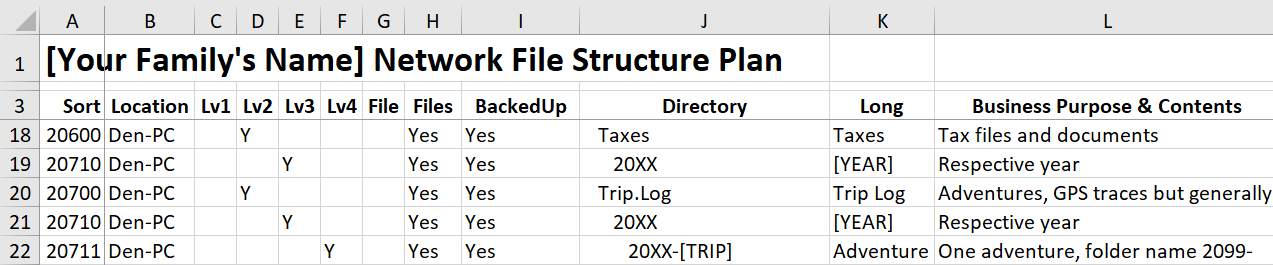
One part of the solution is to know what files you are storing where and having a systematic method to complete this documentation. The Microsoft Excel file available below can help you with this. Based on a documentation tool I have used in a number of organizations, I then tried out on my own person directories.
Of course a tool is of no use without the discipline to create it in the first place and then follow the structure. At the same time if things have changed, then change the structure – just document it first. As an added bonus, the tool allows you to visualize a future directory before you create it.
Example Excel File Directory Documentation Tool.
A Kludge But it Works
Of course this is a pretty rudimentary tool and there are very sophisticated network mapping tools out there (some of which I reference below). As well, this tool is designed to document how the directory SHOULD look as opposed to an audit of an EXISTING directory. As a result, if you are going to finally clean up that directory of files on your home or corporate computer this tool can help you in the design. If you can not open the above EXCEL file you can also build your own File Structure Plan in Google Docs, etc. using the image and definitions provided below.
Enjoy and let me know if it helped you at all.
Column Definitions
- Sort: Simply a number that allows the xls rows to be sequenced.
- This number can be added in whole or part to allow your directories to sort and as an indexing function
- You can add alpha characters, decimals, etc. to aid in the sorting.
- Location: Where is this directory PRIMARILY located, e.g. a home computer, My Documents-Home-PC, cloud location, laptop, etc.
- Lv1-5: Levels within the directory structure in which Lv1 is below the Year indicator and Lv5 is the lowest level generally used.
- Add additional columns for Levels 6 and beyond.
- File: Is this a file?
- Yes, the row represents a file.
- No/Blank, the row represents a directory.
- Files: Will this directory typically hold files or only be a parent directory.
- Yes = holds files and directories.
- No = no files only directories.
- This is an important field so that errant files don’t end up in places they should not belong.
- Backed Up: Is this directory (or file) Backed Up?
- Yes = part of a normal periodic back up.
- No = Excluded, for example because of the location the master directory is stored elsewhere.
- Directory: The name found in the network file share.
- Naming standards I use:
- Permitted characters:
- Alphanumeric (e.g. 0-9, A-Z and a-z)
- Periods, hyphens and underscores (. – _).
- Characters to avoid:
- Non-English language (e.g. accented, Cyrillic, etc.)
- Spaces (the either parse the file name or force a %20 when converted to a web based address.)
- Permitted characters:
- Naming standards I use:
- Long Name: Full name of the directory
- Business: A summary of why this directory is necessary, what is typically stored here.
- Exclude if the Long Name is sufficiently self-evident.
- Tips and Tricks:
- “2X” use when you have saved a file to another directory (e.g. cloud) and this represents the non-master version.
- “__” used as a preface for a file to indicate that it is the master file.
Further Reading
[1] For a brief history of the lowly network drive, see my article “Windows as a Document Manager“.
Interesting Other Sources:
- A free tool to look at existing structures, unfortunately the professional version is outrageously expensive: https://www.jam-software.com/treesize_free/.
- A very cool EXCEL macro [CAUTION, I HAVE NOT HAD THIS MACRO TESTED SO CANNOT VOUCH FOR IT – RUN AT YOUR OWN RISK!]. http://unlimitedexcel.blogspot.com/2012/05/file-directory-tree-map-in-excel.html.
- Some good tips with pretty much the same advice I provided in the above 2005 article: https://www.data.cam.ac.uk/data-management-guide/organising-your-data
 Organizational Biology
Pingback: 2024 Birkie Business Model | Organizational Biology