Small Non-Profit (SNP) Technology usage is considered through a functional model. Simple and complex solutions are discussed for each function.
There are many ways to categorize software [1], nearly all of which is irrelevant to a struggling Small Non-Profit (SNP) board. What is relevant is that they need to keep track of who has paid their dues, when is the next event, and who is interested in volunteering.
What Do Clubs Do?
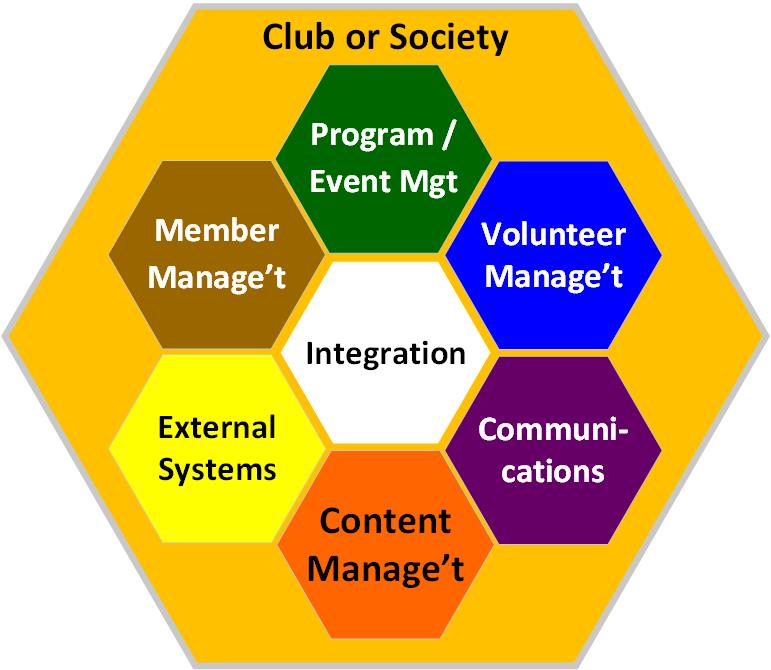
Technology can reduce the ‘transaction cost’ of organizations (noting the cautions provided in the previous blog: Technology Costs, Maturity, and the SNP). Unlike a manufacturing entity, much of what a SNP does focuses on efficient Communication and Coordination [2]. When is the next event, who has volunteered, where is the poster template, etc.
These are covered by the following functions. As the original blog notes (What Do Club’s Do?) Absent are standard functions such as finance, human resources, inventory, etc. which are often less or entirely irrelevant to a SNP [3].
Evolution of a SNP’s Systems
Most SNPs in Alberta will use technology to manage these business functions, greater or lesser degree. However, they may be hard pressed to point to them. These systems are typically co-mingled with each other. For example, an email list may serve as the the basis for a communication system, member roster, and manages the volunteers. As the SNP grows, the need for separate and more dedicated systems grows.
Matching the App, to the Function and to the SNP
For each one of these functions, each SNP will have different needs and potential technology available. The following is my personal perspectives on what is available and when you needs lots or little technology.
Integration
- What is It: Bringing the disparate function (and systems) together is the role of integration. With manual systems, this integration may consume a great deal of valuable and scarce volunteer time, talent and passion.
- Before Computers We Used: Meetings, newsletters, phone calls.
- Simple Apps: G-Drive or One-Drive to store your files, manage a calendar, emails.
- Complex Systems: G-Suite or Office 365, both are free for qualified non-profits. Online collaboration offerings (such as monday.com) may be useful for larger non-profits.
- Comments: For a tiny SNP, a G/One-Drive is probably sufficient. Everything else will take more skills, have higher costs, and may increase the Burden to Volunteer!
Member Registration
- What is It: Collection of information about individual members. This includes tombstone data such as name, address, next of kin, emergency contacts, etc. Club specific information may include ranking (as in a sport), abilities (e.g. first aid certificates, coaching skills) or club related interests.
- Before Computers We Used: A binder or a registry book in which names were added, struck off, or modified.
- Simple Apps: Spreadsheet, FaceBook Group.
- Complex Systems: The good news is that companies such as Wild Apricot offer many of the club functions in a single application. The bad news is that they are not cheap relative to a SNP’s budget. There are dozens (more likely hundreds) of competitors to Wild Apricot including this Canadian company: Karelo.com.
- Comments: There are numerous factors which can be boiled down to quantitative and qualitative considerations. How many members are in the SNP, and how many data points are collected for each member are examples of quantitative. Qualitative is how much you want to actively use the information. For example, as a tool to aid coaches in identifying potential competitors or to match member interests with volunteer opportunities, which leads into…
Volunteer Management
- What is It: This function identifies potential volunteers and matches their skills to the club’s needs. A volunteer’s involvement may be recorded for recognition and managing the Volunteer Lifecycle (for more on this see, see my previous blog: Volunteers in LAST-VEGA).
- There is a large cadre of Volunteer Management Systems (VMS).
- Some additional reading and information on the topic includes:
- Before Computers We Used: A registration form completed by a member with volunteer interests ticked off.
- Simple Apps: Spreadsheet, possibly integrated into the member roster.
- Complex Systems: similar to the membership business functions, functions help with these questions:
- WHO is interested in volunteering?
- WHAT they can do – what do they WANT to do?
- WHEN can they volunteer, when they did volunteer, HOW good were they?
- ARE there reporting requirements on volunteer activities to corporate organization, for example high school students on a community participation rotation.
- Comments: The biggest reason to not volunteer: an individual who registered an interest was never ‘Asked’.
Communications
- What is It: Communications may meet a legislative requirement (filing an annual return), support fund raising, or communications to members (events, updates). Communications may be official (from the Club out); informal, between members; top down or bottom up.
- Before Computers We Used: Meetings, telephone committees (one person phones ten others who may then phone another ten each), mailed out newsletters.
- Simple Apps: Email (obviously), WhatsApp, FaceBook, the social media tool of the day. Google Docs or Office 365 for crafting newsletters.
- Complex Systems: Constant Contact is the good standard for newsletter delivery. Zoom (and its equivalents such as Skype) for remote meeting. Website either managed by the SNP or hosted through all in provider (once again, Wild Apricot for an integrated system). Web hosting providers such as SquareSpace or WordPress.com.
- Comments: Communications is of course linked into the other functions. This is also where SNPs spend a lot of time and effort. Unfortunately, this is also a comfort-zone area. Individuals are loath to move to GMail if they are familiar with MS Outlook. Constant Contact has its own quirks in building newsletters and Word seems simpler but is ultimately less efficient. As communications represents the sinews of the SNP, try not to economize in this area.
Program and Event Management
- What is It: Central to most non-profits is the program. System functions may include event sign ups, game notices, etc.
- Before Computers We Used: Planning meetings, minutes of those meetings, hard copy plans.
- Simple Apps: The communication tool used (e.g. email) may suffice for tiny-SNP event management (for the Club event on Saturday, we will meet…). There are a zillion simple templates for events. Personally, I think this is one of the best – a methodology I developed for the Financial Management Institute a few years ago (2015 FMI-Program Methodology).
- Complex Systems: There is no upper boundary to project, program and event management. Once again, Wild Apricot includes a wholly adequate tool in their offering. There are about a million other tools at varying price points, e.g. monday.com.
- Comments: If you SNP is primarily about providing information to its members and the public, managing events on a spreadsheet will do nicely. If you are running hundreds of events a year, with numerous volunteers, and perhaps some level of risk – consider buying this functionality.
External Systems
- What is It: Systems not under its direct control or the control of its officers. Any Cloud based offering used by the Club is external but falls under one of the above functions as the ability to cancel the subscription is an example of control.
- Before Computers We Used: Manual integration e.g. receiving a print out of members for a corporate arm of the organization and putting it into a binder.
- Simple Apps: A banking system would fall under this. While the SNP may connect its accounting software to the bank, likely a manual reconciliation works just as well.
- Complex Systems: Integrating systems to each other either manually, using vendor supplied functionality, or more technical solutions such as an interface or an API.
- Comments: Automated integration is GREAT until it is not. This is where we get into the world of interfaces, API’s, and other techy things that are perhaps best left alone unless your SNP has either the Talent or the Treasure to manage these complexities.
No Suggestions – But Perhaps a Way of Thinking
I am sorry if you came this far and were hoping to read exactly what software your SNP should buy/subscribe to solve the many challenges it has. The answer to the question on what is the best system is… it Depends:
- Time, Talent and Treasure. Do you have someone who has the aptitude and is willing to take the time to learn (and teach) a new tool? Remember, Experience and developing new Skills are examples of Paying Volunteers through Experience. Can your SNP afford the software keeping in mind that a volunteer hour is worth about $50.
- Maturity and Good Enough. Perhaps a trusty spreadsheet, a willing volunteer, and a tiny SNP makes a mostly manual process ‘Good Enough’. If a key function is at risk because the volunteer-stalwart and their spreadsheet are about to leave, then consider moving up the Maturity Framework.
- Risks and Business Functions. As a board, it is critical that you are evaluating risk. This model provides a lens to do this.
- Not to Burden the Point. Finally, the above allows a SNP board to ask the question, ‘What is The Burden of Volunteering and how does this affect our Volunteer Lifecycle? How much of a better experience can we provide by considering technology, and what are risks and future burdens of doing so?
Can We Talk About This?
While this blog series has not been prescriptive, the next and last in the series proposes running a periodic trade fair between generous (and not so generous) software vendors and Alberta Registered Societies. Ideally this conference will not involve someone asking the question, ‘Soooo, How Much Software Do You Want to Buy’ [4].
References and Further Reading
- Yeah, ANOTHER interesting rabbit hole to go and explore, this time about the nomenclature and evolution of computer software. Suffice to say, there are numerous was to categorize. Cost (Software categories – Wikipedia) Technology Stack (What is Software? Definition, Types and Examples (techtarget.com)), and so forth.
- The first two of the 4Cs. The other two being Command and Control.
- As an accountant, fiduciary accountability is always important but is always scaled to the risk. If your SNP’s entire budget is less than few thousands, a cheque book and a spreadsheet is about all you need.
- From the classic Computer Associates 2003 commercial.
 Organizational Biology
Pingback: Free Software, Get Your Free Software…. | Organizational Biology