
Supporting the previous website step, the key data fields needed to describe each of the volunteer roles for the Birkie.
For those just joining the blog, this is the third in a series about how the Canadian Birkebeiner Society (Birkie) is improving its volunteer management systems and processes. A Spell (and Birch) Binding Use Case provided an overview of the plan and introduced a seven-step plan. Steps one and two were covered in the previous blog, Telling the Volunteer Story(ies).
This post is inter-twined with the first two steps in that it discusses how the details of a volunteer role are captured in a central database. This information is then used to update the website.
- Dedicated Web Site. Telling the Volunteer Story(ies)
- Opportunity Submission Form. Telling the Volunteer Story(ies)
- Opportunity Database. The above contributions will be collected into a Google Sheet which in turn can be queried and displayed on the website.
- Shift Schedule.
- Sign Up Form.
- Schedule Form.
- Attendance.
The Ideal Technical Solution (Results May Vary)
Volunteer management systems automate and centralize the above seven-steps. A change to the description of a volunteer role is immediately reflected in the ‘Sales’ function of the website.
As the Birkie is just embarking on this technical journey, the website and Opportunity Database are, temporarily, separate. In the long term, this is a bad. In the short term, it gives the Birkie flexibility to tweak various fields which out having to rebuild or re-do work done elsewhere.
The Current Technical Solution
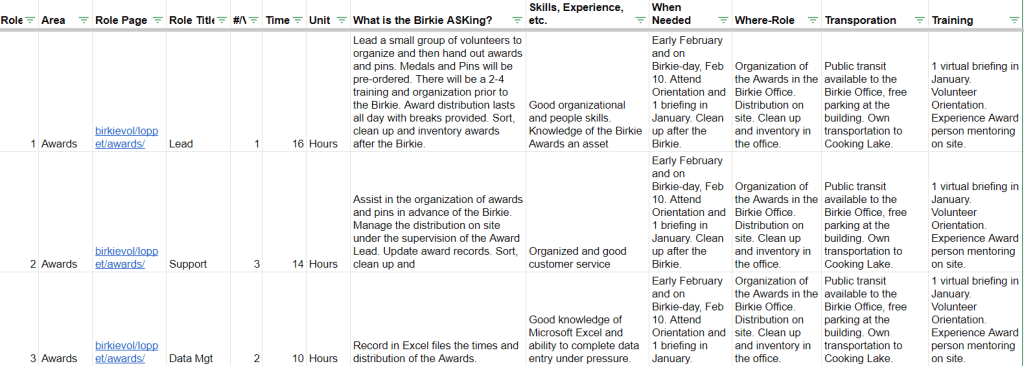
Using a dedicated GMail account (birkievol2024@gmail.com), a shared drive houses a Google Sheet, “BirkieVol-Opportunities”. This spreadsheet has a dedicated tab for the various Birkie Opportunities (as well as some other cool tabs, discussed below). Each opportunity is defined via the following fields.
| Field | Field-Type | Description | Comment |
| _Select | Calculated | Equal to the Role Field. | Used in the Reporting tab |
| Role | Calculated | Concatenation of [Role#]-[Area]-[Role Title] | |
| RoleID | Numeric | Sequential number providing an unique identifier to the Role. Numbers are retired and not re-used. | May be replaced with a more intelligent number. |
| Area | Dropdown List | Select area from list in the ‘Flag’ tab. | Flag tab CRUD is system admin function |
| Role Page | Hyperlink | Link to the Birkie page reference. | |
| Role Title | Text | Concise name not repeating the area. | Lead, Chief, etc. for leadership roles. |
| #/Vol | Alpha/Numeric | Estimated number of volunteers needed across all shifts. | |
| Time-Req’d | Numeric | Number of units the volunteer can expect to contribute. | |
| Time-Unit | Dropdown List | Units of time, typically hours. | |
| What is the Birkie ASKing? | Text | Text describing the specific role. | Exclude contextual information about the role |
| Skills, Experience, etc. | Text | Required and desirable pre-existing skills, experience. | |
| When Needed | Text | General time frame when needed. | Exclude detailed shift information. |
| Where-Role | Text | Where the hours will be contributed. | |
| Transporation | Text | How is the volunteer expected to get to the location? | Include public transit options. |
| Training | Text | What training, orientation will be provided. |
Other Tabs in the Google Sheet
In addition to the Opportunity tab discussed above, there are xx other tabs of note.
- Web-Selector: Allows volunteers to review specific opportunity details. This is a mirror version of the next tab.
- RoleReport: Used in building the website and includes an HTML code generator.
- DataDictionary: Definitions for the Opportunity Tab.
- Flag: Control list of values.
 Organizational Biology
Pingback: Updating Pages – Birkie Volunteers
Pingback: A Poor Man’s (non-profit’s) Volunteer System | Organizational Biology