
How can you ‘bake-safety’ into a volunteer program from the beginning? A business case inspired by the November 23, 2023 conference Non-Profit and Alberta’s Occupational Health and Safety (OHS) legislation.
- Safely Seeing the Forest from the Trees
- Background
- Technology is Nice, Volunteers are Critical
- Safely Visiting the Wilds
- Bob, the Elk, and a Use Case
- Technology, if Necessary, Not Necessarily Technology
- References and Further Reading
Safely Seeing the Forest from the Trees
The 2023 conference provided a good overview of the safety landscape. This post focuses on how one fictional organization, Alberta Citizen Stewards (ACS), incorporates safety throughout its volunteer experience.
ACS visits remote Crown lands and report on their status. Like the Birkie, featured in the November 2023 conference, ACS needed to have a safety plan before the province would be willing to endorse its activities. In other words, if ACS goes down into the woods today, it does not want a big surprise! [1]
Background
Big Safety. Nearly two-thirds of Alberta is public land. Included in this count are national and provincial parks as well as many small ‘postage-stamp’ sized protected areas. Ranging from a fraction of an acre to many thousands of acres, these areas provide local recreation, natural capacity, and provide stepping stones for floral and fauna to move from one area to another.
Established in the late 20th centuries, these same protected areas attract abuse. Illegal off-highway usage (ATVs, motorbikes, etc.), tree-cutting, dumping and squatting are just some of the abuses. ACS volunteers visit these sites and report on their status.
Tech to the Rescue. A mobile application allows for real time recording of images, audio files, GPS locations, and the like. Abuses are transmitted to a central ACS database which is accessed by both the organization and government officials. The central database is tied to other online resources such as inaturalist.org and is accessed by a wide variety of users including researchers.
Technology is Nice, Volunteers are Critical
Boots on the Ground. While ACS employes remote cameras, and accesses satellite imagery to augment its data set, volunteer ‘boots on the ground’ are critical. Who are these individuals? They are a neighbour or someone who lives in the area. Driving the same road, the casual look to the side quickly flags that something is amiss and return visit is needed. Other volunteers are more intermittent and may only visit the site once as they compete in various ACS challenges and competitions to visit sites.
Skill Levels Vary. A minority of the volunteers have advanced training (botanists, biologists, geographers, etc.) and the majority have a strong interest in one or more areas (mushrooms, birds, fauna, history). All enjoy going out to the backyards or further afield to be outdoors and contribute, in a small way, the Alberta’s natural legacy by being an ACS ‘Citizen Steward’.
Safely Visiting the Wilds
‘Beyond OHS for our Volunteers’ is the philosophy the ACS Board has adopted. Not only does ACS’ program comply with Alberta’s Occupational Health and Safety (OHS) requirements, it is ‘baked right into the program‘. This focus on safety becomes a selling feature to attract and retain volunteers. ACS program has 3 key elements:
- Know When You are Stewarding
- Checks Before You Steward
- Learning to Steward Information Safely to ACS and Others
Each element underpins the ACS volunteer experience and its OHS program. This is an important point, it is not either/or – the same activity improves the data collected, the volunteer experience, and keeps the volunteer safe, and coming back!
Know When You are Stewarding
Volunteer Criteria. For logistical, liability, and reporting-consistency reasons, only registered ACS stewards can directly contribute to its information systems. The rationale for a formal registration process is due to the criteria of when an individual is considered a volunteer for an organization. To be a volunteer, they must meet three conditions [2]:
- The organization requests the volunteer’s participation to perform work for the organization;
- The organization accepts volunteers to do the work (informally or formally); and
- The volunteer performs or takes part in the work – for example, teaching students or staff, collecting roadside waste, helping build a house for the organization, etc.
Active Volunteering. A person driving by a site on their way to work is not an ACS volunteer at that moment. If they see something, stop their vehicle and go and investigate, they are a volunteer – but only AFTER they have created a new ‘Site Visit’ session on the ACS application on their smartphone (paper versions are available as well).
Individuals who do not wish to become a formal volunteer with ACS are encouraged to submit a Google Review on the site and/or use other tools such as inaturalist.org.
Checks Before You Steward
An individual has been registered with ACS, has taken the prerequisite training (see the learning discussion below), has been granted access to the ACS Site Visit Application and is now ready to visit a site – almost.
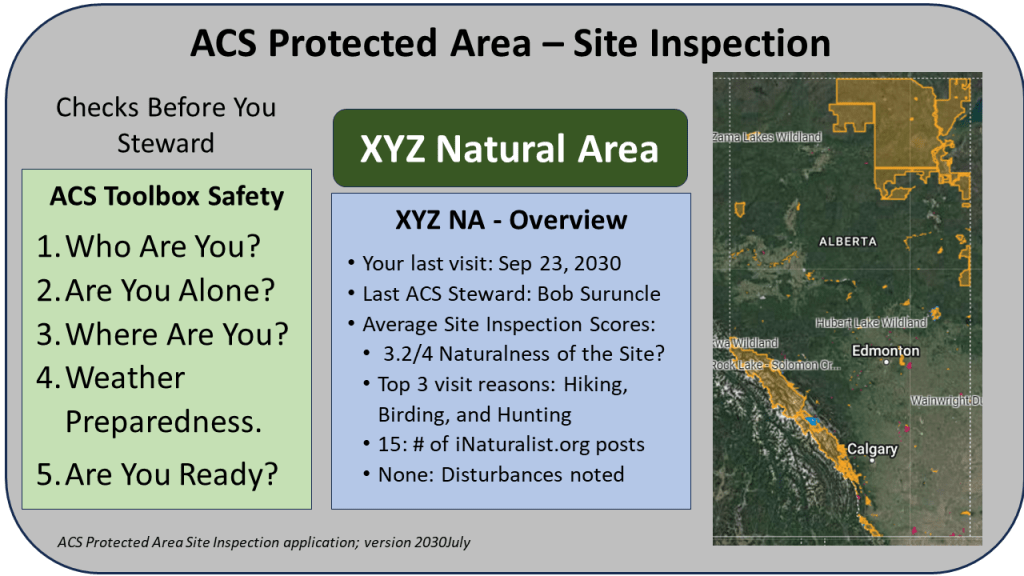
‘Toolbox Safety Check is an example of baking OHS into the process. Prior to each site visit, the applications asks 5 questions to help the ACS volunteer to ‘THINK SAFETY before visiting’.
- Who Are You? ACS confirms who is on the site visit including other ACS volunteers, guests of the volunteer, or counts of other individuals.
- Are You Alone? A reminder to the volunteer to let someone know where they are if they are travelling alone. The application also offers a 30-minute check-in; if a check in is missed, the application will continue to contact the volunteer and has an escalation procedure to the ACS community until contact is re-established.
- Where Are You? An interactive map will allow the volunteer to confirm their geographic location or select a different location if necessary.
- Weather Preparedness. Weather conditions are captured, and the volunteer can add other details.
- Are You Ready? Based on the site and time of year, a series of short questions are asked in the form of a hazard assessment, examples:
- Wildlife encounters (bears, rutting ungulates)
- Travelling equipment (snowshoes, good footwear)
- Stranded Readiness depending on the site and distance from vehicle.
Learning to Steward Information Safely to ACS and Others
Although anyone can download and install the application, an individual must complete mandatory online training and be certified by ACS before they can volunteer and thus submit a site inspection report. Training has three parts:
- 1. Before You Start is the base and mandatory training prior to becoming a volunteer. It covers basic safety topics ranging from driving to the site, encountering wildlife, and an unintentional overnight stay.
- Orientation to the application including how to submit a report.
- An online quiz confirms the volunteer’s readiness to be a Citizen-Steward.
- An annual online safety meeting is required to continue to use the application; this includes re-taking the online quiz.
- 2. Stewardship-GO! taking a page from Pokémon GO, the newly minted ACS steward is ready to visit sites.
- The application is interactive and inherently allows volunteers to (not) be part of a larger community. For example, statistics about how many ACS volunteers have visited the site, when and what they saw.
- Submissions to third party tools such as inaturalist.org are visible.
- A volunteer can opt in/out of who much they want to interact with other volunteers.
- All ACS submissions are visible but anonymization of portions of the information (name, email, emergency contact information) based on the privacy settings selected by the ACS member/volunteer.
- Crucial to each visit is the ‘tool-box safety’ assessment described above.
- 3. More Knowledge-Naturally is the final component.
- Intermediate and advanced training is offered on a variety of topics. This can be done online, through partner providers, and ACS ‘real-people’ events.
- Training is curated by ACS but is typically delivered by third-party providers.
- Volunteers can attain knowledge-rankings in particular areas.
- Individuals are also encouraged to post short blogs about their visits or write for the ACS journal which provides a more in-depth analysis of relevant topics.
Bob, the Elk, and a Use Case
Did I Just See an Elk? Returning to the ACS Steward (let’s call him Bob) who was driving by a site, stopped, and went to investigate. Bob has guru status in ungulates (deer, moose, etc.). Bob stopped because he thought he saw an Elk, unusual for this area of Alberta.
60-Second Safety. Taking out his smart phone, he starts a new ACS site visit session. His hands fly over the screen because he is familiar with the safety questions. Knowing his wife is away, he asks the ACS application to do a 30-minute ‘lone Steward’ check in. After less than a minute on the toolbox safety log in, he is off to check his elk sighting.
Larch and Cut Lines. The application uses GPS logging as he accesses an old cutline. Being early fall, he snaps a few photos of larch trees shedding their needles and confirms submission to inaturalist.org when he has a WIFI connection. The dry grass provides poor tracking for the animal until he comes across the last vestige of a muddy puddle.
Elk, Maybe? There, is a partial track of what he thinks is an elk. He snaps a photo and will ask the ACS community. The photo and other information are held in the phone as Bob until there is a WIFI connection.
Team ACS. Later that night, a half dozen ACS volunteers weigh in and the consensus is that the track is likely an elk. Bob plans to return that weekend to look for better tracks, perhaps get a photo of the animal, and enjoy another day in Alberta’s protected area.
Okay and Late for Work. Because Bob lost cell service in the protected area. When he got back to his vehicle there was an automated text message from ACS confirming that he is okay. He closes the visit through the application. Although Bob was a little late for work, he enjoyed his 45 minutes of being outdoors and appreciated that he could contribute new information about this protected area while his safety was paramount.
Technology, if Necessary, Not Necessarily Technology
The above description may seem to be overtly focused on technology. With over 500 Citizen-Stewards spread across the province, the technology is an enabler to gather information in a low-cost manner. By ‘baking safety’ into the application at the beginning, OHS considerations are inherent to the site visit process rather than an after thought.
Other Data Uses. The technology supports ACS in other ways. For example, it uses it site-visit times for its Alberta Worker Compensation Board account (WCB). WCB appreciates the accuracy of the information and has adjusted the premium accordingly for ACS. The hours collected are also used by ACS to justify and report on grants it receives from governments and trusts. These organization appreciate that they are funding important work contributing to Alberta’s natural state, supporting civil society, and that the activities are done in a safe, learning-focused and fun manner for the volunteers.
References and Further Reading
- Apologies to the much beloved children’s song: Teddy Bears’ Picnic – Wikipedia.
- The three criteria to be a volunteer are listed in this information sheet. Interestingly, these criteria seem to have been de-emphasized in subsequent guidances. “Are Students and Volunteers Workers? : “Are Students and Volunteers Workers? : Occupational Health and Safety (OHS) Information for Employers and Nonprofit Agencies – Open Government,” 2018. https://open.alberta.ca/dataset/9781460142431.
 Organizational Biology
Pingback: Notes About a Safe Space – OHS and the Non-Profit | Organizational Biology
Pingback: Dragons and Protected Areas – April 4, 12-13h | Organizational Biology
Pingback: Alberta Rural MLAs and SAPAA – 2026-03-20 | SAPAA