
Discusses utilizing the Experience Database (Ex-db) to record and analyze experiences. It guides users on populating four key tables with their information and introduces job application statuses. Users can generate reports to compare their capabilities with job requirements, enhancing their resume and job application process.

In the previous blog, Remembering Breakfast & Beyond!, I discussed the value of systematically remembering your professional, educational and volunteer activities in a tool called the ‘Experience – Database’ (Ex-db). I have uploaded a copy of the Access database if want to start using and playing with it. Insert normal caveats of use at your own peril and be sure that you have at least a passing familiarity with Access. I have good intentions of publishing the data model and dictionary in the future. While the techies will have to hold their breath, the rest of you can get going.
>>> Download the Experience Database <<<<
Provided without warranties, use at your own peril, yada, yada....
Getting to Know Ex-db
If you trusted me, enough to click on the above link, you are ready to go. There are four tables to update (e.g. replacing the current dummy-data with your own):
- Applicant: Your name, used in report headers and such.
- Capability: Merriam defines capability as ‘the facility or potential for an indicated use or deployment’. You will map your experience and job requirements to capabilities.
- Job: Where have you worked, volunteered, received education or are applying.
- Personal_Ability: this is what you have DONE in the past in jobs, volunteer roles or education. This is what you can SUPPLY to the job requirement’s DEMAND.
If at this time you are saying, ‘how do you open a database?’ Go back to my warning that you will need some basic Access knowledge. When in doubt, play around or watch a few Youtube videos (errr on Access, not cute cats) to get a minimal level of comfort.
Priming the Ex-db
Priming means working through each of the above tables and replace the dummy data with your own. As a suggestion, follow the above order:
- Name: Enter your name in the Applicant table… this was the easy one.
- Capabilities: Keep, modify, delete or add your own capabilities.
- The ones you will find in the list are accounting focused.
- As you enter your work experience or job requirements, you will identify capabilities you have not thought of, so don’t worry about entering them all at once.
- Jobs: Enter where you have worked as well as where you have volunteered your education, courses, etc.
- Experience: the personal ability table is where you enter the cool stuff you did working for Diary Queen (maybe), studying brain surgery or volunteering with Mother Theresa.
- Enter each experience as if it is a mini-elevator pitch or a resume bullet.
- You can be a bit more verbose than a resume but keep it punchy, to the point, in the active voice and DO NOT Lie!
- Remember to map your Mother Theresa time to one or more capabilities (is beatification a capability?).
Curriculum Vitae in a Box
If you wonder if all of your cutting and pasting is getting you anywhere, try running this report: CV_Job_History_Capabilities. It is a Curriculum Vitae. If there are data issues on the report, go back to the original source data. Check things like dates (closing date is an important one) and whether your have mapped your job experience to a capability.
Once you have the above tables populated and the above report running how you like it, you now have a detailed CV to cross validate your resume. This tool does more though so let’s apply for our first job!
1.Applying for your Dream Job
You find an ad for your dream job. The first step to applying for the gig is to record the job in the Job table and selecting the ‘1.Applying’ status. While you are in the Job table, let’s talk about the job statuses:
|
Status |
Description |
|
1.Applying * |
Actively applying for the role. |
|
2.Reviewing |
Job is being reviewed or evaluated (pins and needles phase). [Not really used] |
|
5.Interview |
You have an interview. [Not really used] |
|
6.Short.Listed |
You have been short-listed. [Not really used] |
|
9.Abandoned * |
Nope, did not get the gig, abandoned this job |
|
7.Current * |
Where you are working now (or volunteering, going to school, etc.) |
|
8.Past * |
Where you previously worked, volunteered, etc. |
The four with the asterisks are the ones primarily used. Assign the job the status ‘9.Abandoned’ when you applied but did not get/take the job. Use numbers 2-6 if you are applying for lots of jobs and want to keep track. Remember, there can only be ONE ‘1.Applying’ job at a time.
Analyzing the Gig
A job ad starts with a general pitch about the company. It will go on to list the role, experience needed, particular skills and education required and then a “don’t call us, we’ll call you” message at the end. In addition to the job ad, the company may also have provided a job description that goes into a bit more detail.
The Ex-db analyzes those details against your experience via the capabilities map. To do this mapping, cut and paste the elements of the job into this table:
- Job_Requirement: this is what a future employer is looking for. It comes from the job ad, job description, volunteer role, school admission criteria, etc. Think of this as the ‘Demand’ part of the Experience-db.
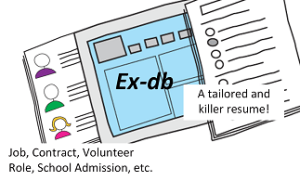
For each job ad element, map it to a single capability. HR departments sometimes embed 7 billion capabilities into one requirement. If this is the case, copy the components into separate rows, one for each capability. As the capabilities map to your personal abilities you can now run the following reports:
- Job-Applying_Capability2Requirements: pivots the job requirements into their relevant capabilities. Use this report to really assess and decide if this job is a good fit for your skills.
- Job_Applying_Capabilities: prepares a map of WHAT you have done in the past for a single capability as compared to WHAT the employer is looking for as described in the ad/description.
So What Now?
The following is conceptual data model highlights the tables discussed above.
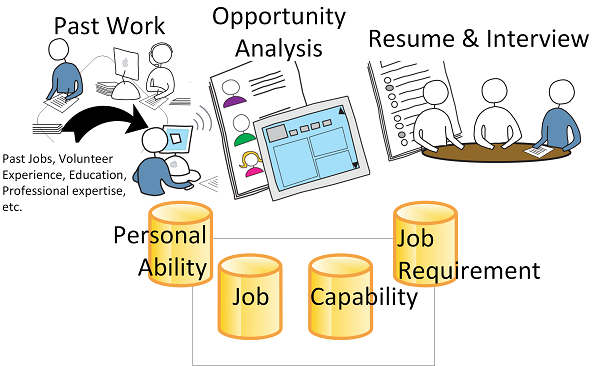
The experience database arms you with the content to build a killer resume. Something you did years ago is now popping up making good resume fodder. Think about using the above reports in the interview itself, heck; give them to the panel if they are good enough. Not only are you demonstrating interest in the position but that you have taken the time to analyze the job.
But What about the Other Stuff?
This blog was about the minimum to get you going using the Ex-db. As for the other tables, queries, reports, etc.: ignore them, go play or wait for future blogs when I discuss them further. In the meantime, shoot me any comments and happy job hunting!
 Organizational Biology
Pingback: An Employer’s Ex-db | Organizational Biology & Other Thoughts