
My blog, Go Forth and Budget, discussed the challenges of a family finding the time, tools and enthusiasm to budget. These challenges were presented in a 2×2 Family Budgeting. This blog provides one solution: A Simplified Family Budget Spreadsheet.
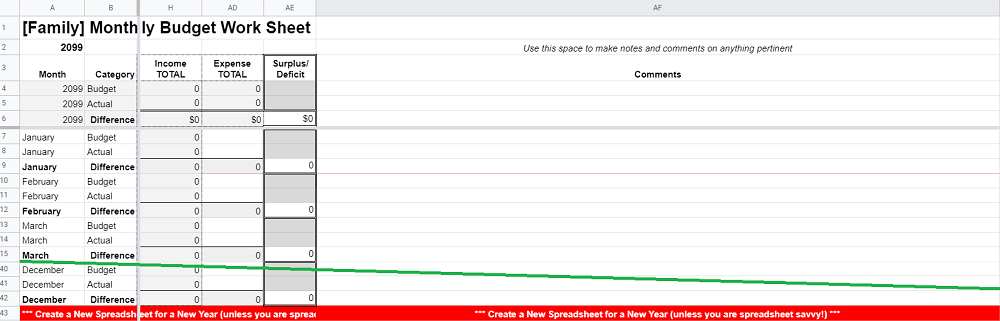
We Don’t Need No Stinkin’ Budgets
For many families enrolled in a financial literacy program, they may never have budgeted or more likely, tried numerous methods and failed. Motivation falters in the face of having to use and learn complex applications. In addition, what is a budget, what happens if you don’t get it perfect the first time, can you subsequently change it, what happens when there is an unexpected expense?
The Simplified Family Budget Spreadsheet cannot address all of these problems but it can start a family on the road to financial independence by being:
- Focused: The spreadsheet teaches the mechanics of tracking spending and budgeting.
- Modular: There are three parts to budgeting: planning, tracking and then reporting/analyzing.
- Budget: The spreadsheet is focused on the budgeting part, establishing a monthly budget. The family is expected to enter their actual expenditures manually from another tool (e.g. a notebook, computer application, etc.).
- Expense-Tracking: If a family does not have another way to track expenses, there is an optional and rudimentary expense tracker.
- Reporting and Analytics: These functions focus on budget versus actual. Too many families fall into a trap of analysis-paralysis trying to understand where their money has gone when the answer is a lack of discipline or planning.
- Temporary: There are dozens of great applications and more sophisticated ways to track spending and budget. This spreadsheet is designed to be used for at least a month and as long as a year. Ideally after this, the family has the confidence to move on to something better – or not. If the family doesn’t mind a bit of manual effort, the spreadsheet could work for years to come.
- Accessible: Based on a Google Sheet, the tool requires no licenses or additional costs.
- Simple: A number of budget spreadsheets are marvels of Excel or Google innovation. Unfortunately, they are prone to breakage leading to frustration and abandonment. This sheet is based on the user understanding 5 things about spreadsheets:
- Enter values in a Cell: to change column headings, budget or track costs, etc.
- Delete or Insert a Column: to remove or add budget categories.
- Navigate Tabs: different information is stored in different tabs.
- Grouping: To keep things tidy, columns are hidden and revealed via the group function.
- Adding and Copying Rows: This is only required if the expense tracker is used.
- Initialized and Checked: A family is not left alone to use the spreadsheet. The intention is that a Financial Literacy facilitator would initialize the spreadsheet on a onetime basis and then check on the progress. This check in would start on a weekly basis and then be incrementally reduced to bi-weekly, monthly, quarterly, etc.
- Customizable: a more spreadsheet-savvy family can add data analytics or more advanced features. This is great but ultimately the purpose of the spreadsheet is to help a family develop the discipline, habits and mindset of budgeting – not ‘Building Another Stinkin’ Spreadsheet‘ [1].
A Quick Tour
1. Tabs
The Spreadsheet has four tabs:
- [YEAR]: Where budget and actual values are entered and compared. Replace the name ‘[YEAR]’ the relevant year, e.g. 2029.
- Categories: Budget categories are a summary of expenses. For example, a family may pay a number of different types of utilities (gas, electricity, water, etc.) but for the purpose of the budget, a single number suffices.
- Cost Tracking [OPTIONAL]: Used when an alternative method is not used.
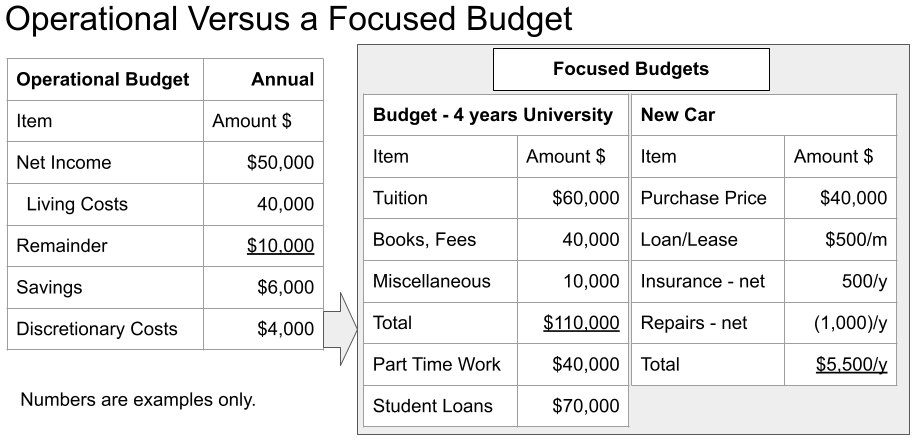
- Goals: Budgets come in two basic flavours: Operational and Focused as demonstrated in the following graphic. Paying for goals (going on vacation, attending school, buying a car) is dependent upon an operational budget having a small surplus. This surplus is then put into savings (for future goals) or to pay for an immediate goal.
2. Initialization & Tweaking
There are some steps done with the family by a financial literacy facilitator to adjust the spreadsheet to best meet the needs of the family. These adjustments are done on a one-time (initialization) and then periodic basis (maintenance).
Initialization. The spreadsheet is generic and as a result is unlikely to represent the financial particulars of the family. Categories are added, removed, modified or ‘left for now’. Initialization may take two or more sessions before the family can successfully enter their first month’s budget and associated costs.
Tweaking. These are ongoing minor or potentially major adjustments. It should be stressed that this is success to the family. Better aligning the tool to the family increases the success the family will remain motivated.
3. Usage & Abandonment
The first month’s budget is going to be terrible, sorry. There will be extraneous and insufficient columns and estimates that are wildly unrealistic. The family needs to be assured that this is normal and upward-arm-throwing is not required. Instead, lessons are learned from that first month and applied to the second, and then third and so on.
The tool will be wildly successful if the family abandons it for something better. Manual entry is clunky and there are computer and phone based applications to do this work. However, the family should be encouraged to use the spreadsheet for one to three months tweaking as they go along to make it more relevant.
If they select a new method, they should consider maintaining both for at least a month in case the new way of budgeting is not successful.
Thoughts, Comments and Next Steps
If you are a techy or an accountant, you are probably looking at this tool and saying, ‘common-on, where are all the whiz-bang functions?’. I have purposely left these out unless they were critically important (e.g. drop down menus).
A family who can create these functions is encouraged to do so in their own version – and then share the enhancements. Such sharing will create investment on the part of all of the families which will contributed to motivation.
I am impressed with Google Sheets. A decade ago, being an advanced Microsoft Excel user, I dismissed them as being insufficient. Google sheets is now very close to Excel in functionality and in some ways is easier to use than Excel.
Do you have any thoughts or comments on tools, motivations and methods to teach financial literacy? As always, leave me a comment or request access to the spreadsheet.
Notes and References
- A much-parodied line from the book and movie of the same title, The Treasure of Sierra Madre.
 Organizational Biology