
Running an effective meeting requires both skills and tools and the latter is the focus of this blog – the ‘Meeting in a Box’.
I have an interest in civil society and generally we think about such things at a meta or strategic level. How to reduce corruption, ensure fair elections or protect minorities. Civil society starts at the grass roots with a school council, soccer club or cat rescue society. Typically run by volunteers, one constants across all organizations is the meeting.
Why Do You Need to Track?
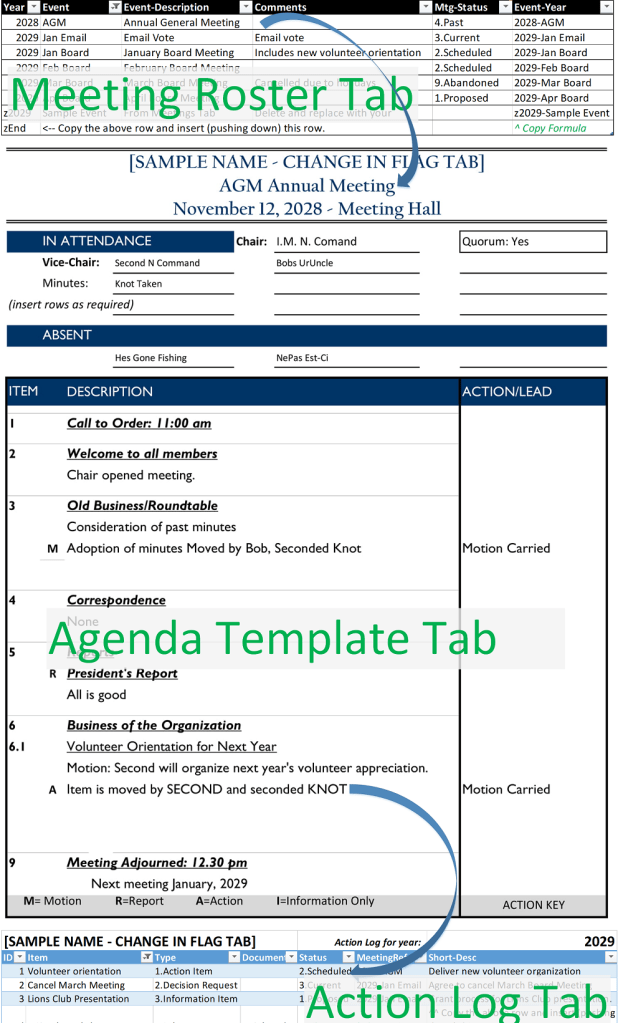
The Meeting in a Box has 3 distinct parts:
- Meeting Roster: When have we met and when will we meet.
- Meeting Agenda: Who was/will be at the meeting, what was/will be discussed and what decisions were/will be made.
- Action Log: What was decided, who will take action, when will an action be reviewed by the meeting and when should the action be best forgotten and abandoned.
The 3 parts support an effective meeting and an effective organization. After all, if you can’t remember decisions made at a meeting, who is doing what, then the meeting time (and cost) was wasted.
Mechanisms and Containers
The following Microsoft Excel Spreadsheet (xls) is has the three parts (roster, agenda and action log). You can start to use the tool immediately or, if you are more technically inclined, customize it to fit your specific needs. Meeting in a Box is best managed as a resource available to everyone who will attend or need to know about the results of the meeting. Thus consider converting the following file into an online version if you access to Office 365 or Google Docs. My go to favourite is a Microsoft SharePoint list. Choices notwithstanding, the xls below will get you going.
Download the ‘Meeting in a Box File’
Excel Skill Level required: Beginner. You should be able to copy and paste Worksheets (Tabs), Insert Rows, Copy Rows and enter data in Excel.
There are five tabs in the file with the following functions:
- Agenda-Template: By making a copy of the template and renaming each new Worksheet (Tab) you can have all of your agendas, and minutes, in one Excel File. (Shout out to Harriet Tinka for the original template).
- Action-Log: A list of things the committee or organization is doing, intends to do or should know about. The ID is important and should be unique meaning that Action Item 13 should only be used once.
- There are four types of ‘actions’ although you can add more in the ‘Flag’ tab (discussed below):
- 1.Action Item: An accountable individual must complete a set of tasks resulting in a decision, deliverable, etc.
- 2.Decision Request: A decision by the [BOARD], the question to be phrased in a Yes/No format.
- 3.Information Item: Information provided to the [BOARD] for which there are no resulting actions or decisions.
- 9.Other: Information to the [BOARD] not described above.
- Status lets the board manage and plan for action items. Filters can suppress action items set to ‘4.Past’ or ‘9.Abandoned’.
- MeetingRef is the anticipated meeting when this item will be resolved. The list comes from the Meetings Tab.
- There are four types of ‘actions’ although you can add more in the ‘Flag’ tab (discussed below):
- Meetings: A list of relevant meetings. This is a surprisingly handy list as it allows for the Chair and members to schedule and plan for critical activities (e.g. elections, budget setting, vacations, etc.).
- Flag: is simply a central repository for values used elsewhere such as the name of the organization, definitions of selections, etc.
- RobertsRules: Provides a high-level set of definition for typical terms used by organizations and committees; this tab is provided for reference only.
Just Enough Governance
Hopefully you will find the tool to be useful. Drop me a note if you make any significant changes or enhancements to it. I have tried to keep it simple so that your next meeting can be more productive.
 Organizational Biology