
Notes on how to document and manage Oracle Data Integrator (ODI) or similar extract, transform, and load (ETL) tools. A bit of a lengthy memory jog for the author.

A small caveat, this blog is about a public sector organization ‘AGOV’; a fictional mash up of recent experience, past knowledge, and research. I like to blog to remember and a good memory device is to tell a story. A story always works better with sympathetic characters, such as AGOV.
Sample Files used in this blog:
- _ODI-ScenarioLog – Spreadsheet Inventory, Detail ODI Listing, and Scheduler.
- [NAME]-ODI-FactSheet – Sample Fact Sheet.
Oracle Data Integrator (ODI) is a 3LA you should be aware of, particularly if you have an Oracle eBusiness Suite ERP (eBS). It can transform information, ensure it gets to the right place and can clean up after itself by archiving files, sending notifications, updating audit logs, etc.
- ODI’s – What’s Not to Love and a Little Knowledge is a …?
- ETL’s Have an Image Problem
- Anatomy of an ODI
- ODI, How Do I Use You, Let Me Count the Ways
- ODI as a Footnote
- The Redemption of ODI
- My Way or the … Better Way?
- What Next?
ODI’s – What’s Not to Love and a Little Knowledge is a …?
Technical-Magic. ODI has been in the background of my career. I had a vague notion that it was important to the technical-magic of reports, interfaces and the like. I became more familiar with ODI while running a project for AGOV – a large public sector organization.
Feeding the System(s). AGOV uses Oracle’s eBusiness Suite (eBS) but also has a number of cloud applications. Data needs to be moved to/from the cloud as well as internal systems such as data warehouses and data marts. AGOV also has non-Oracle subsystems which need to be fed – a perfect world to use ODI!
Techies – Beware! Because I am a business user, and not technical, I apologize profusely for all the errors and simplifications in the following. This is not a blog for techies but instead a story of how AGOV was able to not only upgrade its ODI installation but also document and better understand ODI investments.
ODI Not the Only ETL. A Google search yielded a gazillion ‘extract, transform and load’ (ETL) tools in the marketplace. If you are using one of these, AGOV’s story can help you upgrade and document your ETL tool – just change a few of the techie bits.
ETL’s Have an Image Problem
ETLs are not an End User Tool. They work in the bowels of the machine getting their job done. As organizations increasingly move to the cloud and need to move data from one vendor to another, their importance and role will increase.
Image Problem – ‘Techy’ Focus. I have provided a layman’s explanation of ODI for those who want to understand its unique terminology in a ‘blog-annex.’ In summary, the word ‘scenario’ is all you need to know. One scenario moves one data set from point A to B with any associated transformations, queries, notifications, archiving, and it can wash the dishes in the staff lunchroom (okay, not entirely sure about the last one).
Faithfully Delivering Information is great – and OH SO BORING. Also, they are a means and the ‘end’ gets all the glory…. Until something goes wrong and then ETL-technologies are showered with unwanted attention. At the same time, it may also be discovered that the business-documentation of a Scenario was sparse, understanding how to maintain the technology limited, and business awareness of its importance nonexistent.
Anatomy of an ODI
An ODI Scenario has ‘only’ has three parts: Input, Process (or a Job), and Output. These parts can be repeated, nested, or re-used multiple times.
Inputs and outputs can extract/write to most ‘containers,’ for example, a table, table-view, or a file (text, xml, csv, etc.). There are a wide variety of Processes or Jobs. For simplicity, I have divided them into the following 7 categories:
| Type | Description |
| Copy | Copies, moves, or otherwise extracts data from a table or other container. |
| Mark | Data is marked as processed, flags are updated, files archived, etc. |
| Notify | System or user is notified by email, table update, etc. |
| Transfer | Transfers data, files, etc. from point A to Point B. This may be done via a ftp server, direct data link, etc. |
| Validate | Validates another process has occurred; works in conjunction with ‘Job-Mark.’ |
| Generate | Generates and/or transforms information that did not previously exist. |
| Call | Calls or initiates another process or procedure outside of ODI. |
ODI, How Do I Use You, Let Me Count the Ways
AGOV moves data within the organization and external to it. These systems can be categorized as:
- Cloud-Update. Supporting a cloud-based budget system by transferring data to/from the cloud from its on-premise ERP system.
- Internal Data Warehouse updates from its ERP system. These systems will manage the data once it is deposited as a file or into a staging table.
- Non-ERP Systems. Like the above, a file is delivered or received from the system and the ODI Marks and archives the files as being completed.
ODI as a Footnote
Like any valuable tool, ODI needs to be properly used, maintained, and documented. An ETL can suffer from poor documentation for a variety of reasons such as:
- Stability as a Curse. Because ODI is stable, it can easily be forgotten, and the documentation misplaced as new projects come and go.
- ETL is Not the Focus. The business wants data moved – how is irrelevant. As a result, ETL exist only as a technical document and at best, be a footnote in the project closing report.
- Not a Core Competency. Given their stability, an organization has outsourced its ETL development. Maintenance may have been sparse over the years. The consultant who wrote the documentation left years ago.
The Redemption of ODI
AGOV had many of these challenges (plus a few more related complications). As a result, there was poor ODI code pedigree. A portion of the project effort was spent confirming that all the operational ODI scenarios had been identified (a few had rolled under the chesterfield, for example). The project provided an opportunity to (re)-create documentation in a systematic consistent manner. In other words, never let a good crisis go to waste!
My Way or the … Better Way?
These are good intentions, but how do you systematically document the lost and forgotten, particularly for a business audience that does not even know it relies on an ODI scenario? Just as important, how do you learn from past developments and begin to standardize and create a best practice for ODI creation? My answer was to focus on the business use of ODI. The redemption of ODI had four components:
- CONTROL LIST. Creation of a Control List of ODI Scenarios and their Components.
- FACT-SHEET. Consolidate components into a ‘Fact-Sheet’ for each ODI. This is a business focused document designed to unite the technical and business understanding of ODI.
- LIBRARY of relevant documents or links to such documents in a SharePoint library.
- SUSTAIN. Leave a systemic legacy of knowledge that can be sustained.
- SCHEDULE. Develop a basic scheduling tool to help reduce conflicts in running the ODI’s.
CONTROL LISTS: Excel if Necessary but Not Necessarily Excel
A spreadsheet is a good basic tool to document your ODI’s. A non-exhaustive search failed to turn up a better method on the market. The disadvantage of Excel is that it has poor access control, versioning, etc. The advantage is that it helps you model the underlying data in case the functionality is transferred into an application or a third-party tool. Whether a Spreadsheet, SharePoint list, a database, or another functionality – two lists are need:
- Inventory of ODI, tables, files, processes, reports, etc.
- ODI-IPOM maps the elements from the Inventory to a single ODI as an Input, Process, Output, and Message (IPOM).
CONTROL LIST: Use Case
To demonstrate the control lists, let’s consider an ODI which queries four tables and writes the results to a staging table which is then consumed by a bespoke application (used by internal audit). The ODI is run daily at 1:23am and the staging table is over-written at the start of the next job. The pseudo-code is:
- Run export query, against tables 1,2, 3 and 4.
- In the ‘Bespoke’ application, delete any values in the ‘Stage-Table.’
- Write the result from the Query to the Stage-Table
- Confirm that the record count and hash totals equal between the tables, or
- Send an email to ‘Bespoke-Manager’ the data did not load.
CONTROL LIST: Inventory
The Inventory table contains all objects used by the ODI Scenario, noting this documentation is for the business user. I am stopping at the table and query level without listing individual columns, etc. The following shows the values in the Inventory list for the above use case (four input tables, one output staging table, one key query, and a list of processes or jobs).
| Name | Type | Res | Freq | Time | Owner |
| AP_CHECKS_ALL | Table | eBS | NA | Finance | |
| AP_INVOICES_ALL | Table | eBS | NA | Finance | |
| AP_SUPPLIERS | Table | eBS | NA | Purchasing | |
| Job-Call | Job | ODI | NA | IT | |
| Job-Copy | Job | ODI | NA | IT | |
| Job-Generate | Job | ODI | NA | IT | |
| Job-Mark | Job | ODI | NA | IT | |
| Job-Notify | Job | ODI | NA | IT | |
| Job-Transfer | Job | ODI | NA | IT | |
| Job-Validate | Job | ODI | NA | IT | |
| ODI_Audit_Load | ODI | ODI | Daily | 0700h | Finance |
| XXAGOV_Audit | Table | Custom | NA | Finance | |
| XXAGOV_AuditLoad | View | Custom | NA | Intern- Audit | |
| YY-QATool-LoadMe | Table | Bespoke | Daily | 0700h | Intern- Audit |
CONTROL LIST: ODI-IPOM (Input, Process, Output, and Message)
Using the above values, each ODI Scenario is then assembled. The same components can be used in multiple ODI Scenarios.
| ODI-Scenario | Direction | Component | Comment |
| ODI_Audit_Load | Input | AP_CHECKS_ALL | |
| ODI_Audit_Load | Input | AP_INVOICES_ALL | |
| ODI_Audit_Load | Input | AP_SUPPLIERS | |
| ODI_Audit_Load | Input | XXAGOV_Audit | |
| ODI_Audit_Load | Job-Generate | XXGOV_AuditLoad | Run export query, against tables. |
| ODI_Audit_Load | Job | Job-Call | Purge Staging Table for records marked imported. |
| ODI_Audit_Load | Job | Job-Transfer | Write the result from the Query to the Stage-Table |
| ODI_Audit_Load | Job | Job-Validate | Validation routine confirms record count and hash totals equal |
| ODI_Audit_Load | Job | Job-Mark | Mark new records as validated so Bespoke application can process and then mark them imported. |
| ODI_Audit_Load | Job | Job-Notify | Email to Bespoke application data is ready; email Finance contact if transfer has failed. |
| ODI_Audit_Load | Output | YY-QATool-LoadMe | Staging view in QATool |
Just the FACT (SHEET) Ma’am
Combining the description of the ODI (from the Inventory table) and the components (from the ODI-IJO table) provides a high-level summary for each scenario. Presentation of this information can take many forms. For example, the Excel lists can be brought into a PowerBI or visualized through other tools. More simply, the result can be left in Excel. In between, lie things like cutting and pasting the results into a word document or connecting the lists to Microsoft Excel and using that as the reporting tool.
The Library of Consolidation
Story the resulting FACT Sheets in a library with this and other ODI-related documentation. Remember, this is a business-focused library so try not to bury it deep in the land of techies.
Do you Have Time for to Talk About Scheduling?
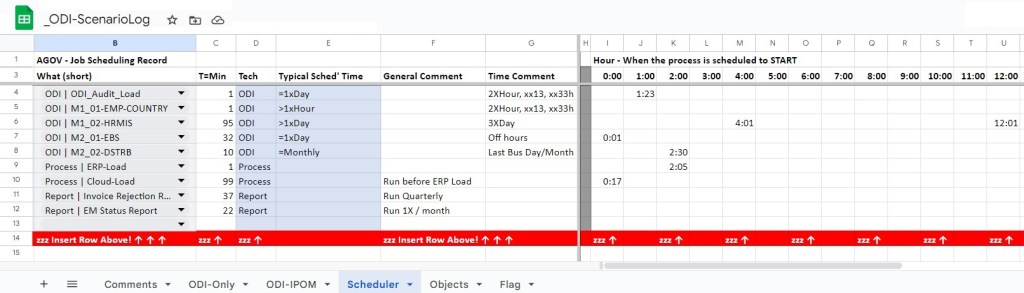
To round out the documentation, the AGOV also set up a “poor-man’s” scheduling tool. This spreadsheet provides a visualization of when ODI and other jobs were being run. To be clear, there are LOTS of better tools on the market to do this – AGOV was not ready to implement though so a spreadsheet scheduler was better than guessing when what jobs will run when.
What Next?
Documentation is a complete and utter waste of time… until the moment it is needed. Therefore, figure out how the documentation will be used and work backwards from that point. The above tries to use the philosophy of ‘just enough documentation’. Interestingly, I am hoping to use the same structures on my next challenge, rationalizing a complex reporting environment and trying to cull a decade of effort/junk!
As always, drop me a line if any of this is useful. Feel free to use with attribution. Reach out to me if you have questions.
 Organizational Biology
Pingback: Memories of a Data Conversion | Organizational Biology