
A blog with a short life span as Oracle Business Intelligence (OBI) will be de-supported in 2025. Introduces key concepts used in the Mount OBI blog series.

This is a strange blog to write for a product whose life-expectancy dwindles every day. Oracle is encouraging its client base to move to its cloud offering, Oracle Analytics Cloud or its on premise Oracle Analytics Server [1]
Off OBI, Onto… Of course, if a client is moving off one technology, there is no guarantee they will stay with the existing vendor. There is no shortage of offerings in the Data Visualization space (a discussion way beyond the scope of this blog series!).
How Many Ways to Skin a Visualization
No matter the technology, there are some basic concepts that all data visualization tools share (until we can interact with the data via a virtual reality interface that involves floating through Cash Flow Statements). These concepts include:
- Data Container: Servers, networks, security, operating systems, etc.
- Visualization Palette: A technology to build ways to present information, this is OBI but also Microsoft PowerBI, Tableau, etc.
- Folder (Maybe): A sub structure to helps organize content and apply security. OBI used the folder concept, there may be others.
- Dashboard: The single palette to create a visualization, this is a reporting-blank canvas.
- Page/Tab: Sub-palettes within a dashboard to reduce the clutter on anyone dashboard; typically supports drill down, security/access, etc.
- Object: The ‘thing’ that is presented on a page. This may be a text base report, graph, text information, interactive-chart, etc.
- Prompts, Links, and Misc.: Prompts narrow what is presented through an Object. Links allow for OBI to be a clearing house to other Pages, Dashboards, resources, etc.
- OBI-Object: A collective noun that includes the reporting-things as well as pages, dashboards, prompts, etc.
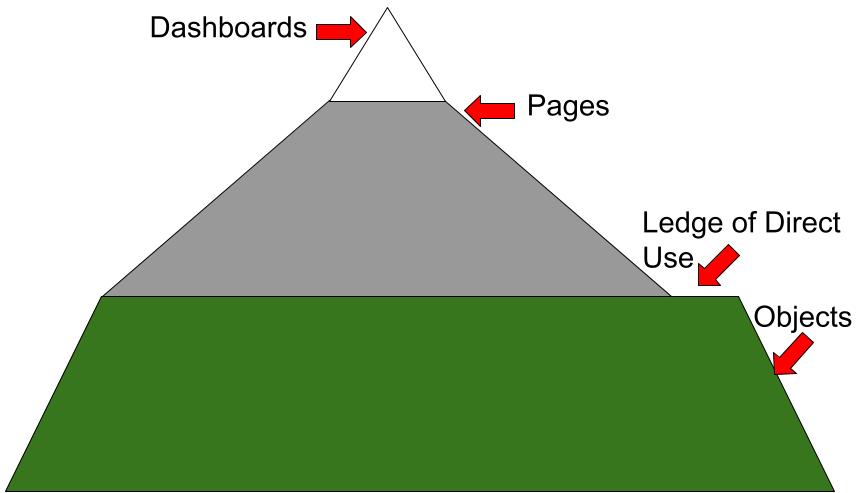
Species Identification on Mount OBI
OBI does not have a handy ‘tag’ field which allows for the easy identification of a single object. Instead, the unique identifier is the concatenation of at least 3-fields:
- Folder the Object Resides in.
- OBI-Type, e.g. Dashboard, Page, Report, Prompt, etc.
- Name of the Object, e.g. Year-End Dashboard, Current Asset ‘report’, Exit Interview Page on an HR Dashboard, etc.
Vendor-Centric Identification. While working in the tool itself, this is not a problem. The challenge is when reporting information is analyzed outside of OBI. A very brief survey of peer visualization tools suggests this is a common deficiency. There is an assumption that the organization’s has only deployed the vendor’s tool. This vendor-centric perspective highlights the need to identify objects clearly, accurately, and consistently from OBI and other systems.
Off to Vendor-Agnostic Identification. An inventory system for OBI can be applied to other reporting/data-visualization tools used by an organization. With this overview, time to start talking about Tagging and Bagging on Mount OBI.
References, Notes, and Further Reading
- An excellent overview of options available to Oracle Clients: OAS, OBIEE, and OAC: What’s Changed and What Hasn’t (us-analytics.com).
 Organizational Biology