
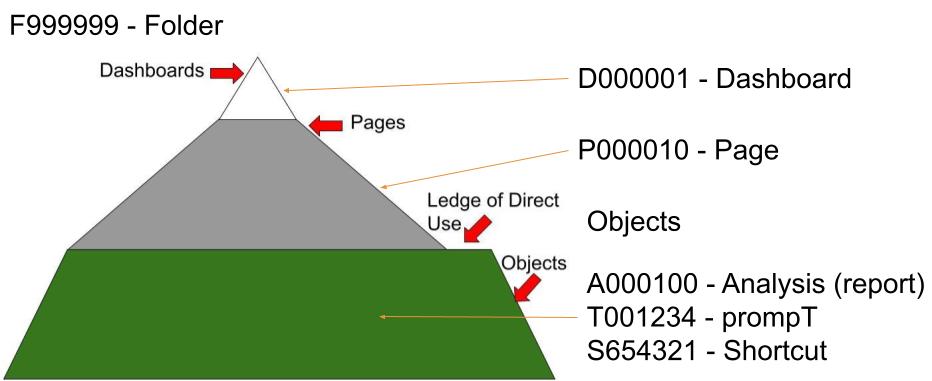
Users think of an Oracle Business Intelligence (OBI) Dashboard as a single entity. OBI uses an ‘a la carte’ method in which ‘Objects’ can be assembled and re-used across multiple Dashboard. This Modular approach drives the need for an effective inventory system.
The Magic Buffet
Lobster Tails and Data. In the first blog of the series (Introducing Mount OBI), a buffet metaphor was used for OBI. Diners can load up their plates from a wide variety of serving-stations. Lobster-tails are expensive, so some stations have restricted access. More savvy diners have built their own serving-station but in doing some duplicated pre-existing offerings. Because of this duplication, and tweaking of the dishes, the food (data) quality may become suspect. Other serving-stations might be half built because of poor quality contractors. But still other serving-stations…
With Great ‘System Access’ Great Responsibility! Okay, enough of the food metaphor and back to OBI. The point is that flexibility has both costs and benefits. While OBI can bend data into multiple shapes to support user needs; power-users can also bend OBI out of shape inadvertently. As Peter Parker’s (Spiderman) Uncle said: “with great power comes great responsibility” [1].
Inventorying the Lobster Tails
Branding OBI. AGOV decided not to restrict the creativity of its advanced-users nor the flexibility of the tool. However, it did institute a registration process for corporate resources. A corporate resource is defined as an OBI-Object maintained by the IT Department (or an Owner) and available to all users subject to data stewardship restrictions. Users could consume these corporate resources however they liked but had to follow a prescribed change request process to modify them. In this respect, each OBI-Object was branded.
Branding More Than OBI. Although specific to OBI, the following branding method can potentially be used for other reporting systems. A Dashboard may be an OBI, PowerBI, or a Tableau variety. The tabs/pages and Objects/tiles are similar across different systems. To simplify this blog, however, only OBI will be considered.
Where to Put the Brand. OBI does have user defined fields and as such, the only location to store tag information is in the description. AGOV reserved the first 43 characters of the description field for the Asset-Tag, e.g. “|D123456| (Do Not Modify or change this Tag)“. A leading and trailing “|” helps to parse the tag. If an object is not registered, then the first 7 + 37 characters can be left blank, or a placeholder entered: “|PEND’G| (Do Not Modify or change this Tag)”.
No Brand, No Guarantees. Registration means that the OBI-Object is recognized and managed by the IT Department. A lack of a tag places the OBI-Object as some risk as it becomes the responsibility of the Owner to maintain and manage it.
Tag You’re IT. A six-character tag was adopted by AGOV. The first character describes what is the Object (e.g. Dashboard, versus Page). Although redundant, this provides an easy sort field and is useful to the human.
- Dashboard
- Page
- Analysis
- prompT
- Shortcut
- Folder
A five-digit sequential number allows for up to 100,000 distinct objects. Once a tag is used, it is retired and not re-used. The list of values is managed via a central inventory. Initially a spreadsheet, AGOV is considering more sophisticated Data Governance tools.
Manually Entered, Periodically Reviewed
Tags were initially entered manually to OBI from the control list. An annual (periodic) review of the tags confirmed the following:
- No loss of the OBI-Object due to corruption of the tag, inadvertent deletion, etc.
- No duplication of the OBI-Object Tag because of an incorrect copying of the Object.
- Ownership confirmation as well as validation of the description for the Object.
Tagging and Updating the OBI Objects is a long-term activity. While there is a high initial cost, the benefits quickly accrue particularly in support of the transition from OBI (see Death of Mount OBI) to another system. OBI Dashboards as well as other reports/visualizations are a corporate asset needing that cost money to create/maintain and are key to the organization. Like any internal control activity, there is a cost to knowing what the organization has, who is using it, and where the heck it is located!
References, Notes, and Further Reading
- Comic book nerds will recognize this homily. For us less nerdy types, there is Wikipedia: With great power comes great responsibility – Wikipedia.
 Organizational Biology