Needed: 1 Good Intern

Do you know someone who has just graduated from an accounting, business or finance program and is considering pursuing the new Canadian-CPA designation?

Advanced Education CPA-IT Intern Program

Within the ministry of Advanced Education I am recruiting my first ‘pre-CPA’ intern. I am looking for that one person (young, new-Canadian, new career) who can shine and make the program widely successful within the Government of Alberta.

I am keen to have the right person because:

  1. I love working with bright, motivated people who push my envelope and who I can mentor to future success
  2. The first often influences the rest – I want that one person who helps others to understand what a successful intern program looks like; success to creates success
  3. As the ministry of Advanced Education, I want/need to demonstrate that we walk the talk in fields of learning and leveraging Albertan and international post-secondary graduates

Below are two key links, one an overview of the recruitment the second my philosophy on running intern programs.  As time and interest permits, I will post future blogs on the value of things like:

  • Running pre-recruitment conference calls
  • The value, costs and benefits of testing before selecting the short list
  • Onboarding the first intern, how hard can it be?
  • The pre-CPA-Training program: does it work and its value

Key Links

Inventorying IM/IT in the Grey Zone

Question #2 of the SWOT+4 IM/IT Planning Model asks: ORGANIZATIONAL IM/IT: How can/does/should Information Management/Technology (IM/IT) support or impede what is important to the organization; does the organization have the right IM/IT and if not, when will it get it?

Although there is a lot stuffed into this question, in this blog I want to focus on a small but important part of Question #2, what do you currently have for IM/IT resources?  If you have read my prior blog, you will note that this is an area managed by Step 13: IM/IT Fleet and Resoure Management of the IM/IT Lifecycle Model.

Before dashing off and building new IM/IT resources, should organizations not know what they have in the cupboard to start? Over the past twenty years, I have been amazed at how hard this question is to answer. So, to find the answer, let us define the problem, “what exactly are we counting when we inventory the systems”?

Does the organization count its office productivity software (e.g. Microsoft Office)? If so, how many times should it count it? Once for the organization, once per user or once per every file created? Is a memorandum written in a Microsoft Word file an IM/IT resource that should be inventoried as a resource?

Likely most people would tend to say no to a Word file. Okay, how about a Word Mail merge file that supports an organization’s marketing effort? Perhaps this file has had thousands of dollars of custom Visual Basic scripts developed for it and links and performs unique functions within the organization. Would this Word file now count as an IM/IT resource? This mission critical ‘application’ is now entering the “grey zone”.

The grey zone is when IM/IT resources go from a commodity (e.g. Microsoft Office) to an operational, tactical or strategic resource for the organization. In developing an inventory of applications, the following graphic is my current thinking about what to count, including what I would see as the grey zone.

The Two Dimensions to Measure Which IM/IT Resources Should be Inventoried.

The Two Dimensions to Measure Which IM/IT Resources Should be Inventoried.

The horizontal axis asks the question, what knowledge is necessary to make changes to the application? As you move left to right, there is increasing technical knowledge needed to make a system change. The vertical axis asks the question, is this a purpose built application or one that was created specifically for the organization? Applications at the top are purpose built; those at the bottom are common to any organization or user.

This blog is a teaser and in the next one, I will overlay applications your organization may have lying about on top of the model. Let me know your thoughts, do I have the right measures or are there more than two dimensions that should be measured?

IM/IT Lifecycle – Re-Do

Thank you to those who provided comments on my previous IM/IT Lifecycle Model.  Your collective whacks on the side of my digital head identified a number of areas of improvement.  Thus, this is a Re-Do blog with what I think is a much better model.  Thanks again for your comments!

The previous blog introduced the SWOT+4 Planning Model. The value of the model is the ability to focus on specific elements of IM/IT planning. Once an organization is successful with one part of the model, it can move on to other areas needing improvement. This blog will introduce a tool to evaluate the robustness of an organization’s IM/IT lifecycle. Intended to be an introduction, future blogs will drill down further.

The Role the IM/IT Lifecycle Model plays in the SWOT+4 Model

One of the first areas of model to evaluate is internally focused on the IM/IT needs and capabilities of the organization. In the SWOT+4 model these are represented by the organization’s IM/IT strengths and weaknesses and specifically questions 2 and 3:

  • Q2. ORGANIZATIONAL IM/IT: How can/does/should IM/IT support or impede what is important to the organization; does the organization have the right IM/IT and if not, when will it get it? (Answered by IM/IT Lifecycle Steps 01 through 16)
  • Q3. IM/IT CAPACITY: How well does the organization DO IM/IT, is it getting better, worse or about the same? (Answered by IM/IT Lifecycle Step 00)

Context for the IM/IT Lifecycle Model

The IM/IT Lifecycle Model is an adaptation of the Asset Lifecycle Model. While the Asset Lifecycle Model focuses on the management of tangible assets, the IM/IT variation is concerned with the acquisition of things like computers and technology systems. The governance, system and audit functions at the bottom of the model answer questions #3, what is an organization’s IM/IT capacity? All the other steps answer question #2, what are the organization’s IM/IT needs and are (or when/how will) these needs to be fulfilled or they support the accounting and reporting functions.
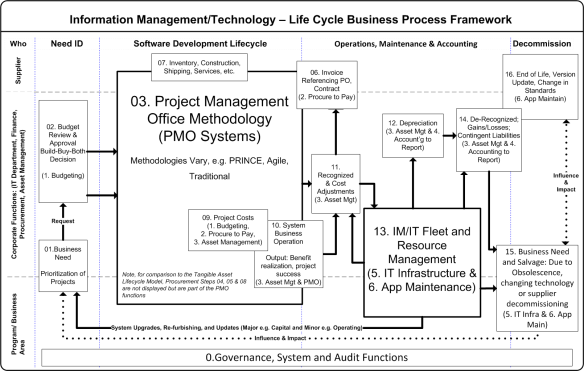
Information Management/ Techology Lifecycle Model (revised March 1 2014)

Information Management/ Techology Lifecycle Model (revised March 1 2014)

IM/IT resources move through the model from left to right and may use more or less of each step depending upon the nature of the IM/IT system. In theory the model applies equally well to both technology (infrastructure, applications) as to information itself (data, reporting, data standards, etc.).

Two steps of note are Step 03 and 13. Step 03, the Project Management Office (PMO) replaces the requirements specification in the Asset Lifecycle Model but is broader and ideally encompasses other steps. For example, a good PMO methodology incorporates procurement processes such as issuing requests for proposals (Step 04), managing resulting vendor contracts (Step 05) and managing the vendor provision of assets, software, licenses or consulting services (Step 07).

Step 13 replaces the asset management function in the Asset Lifecycle Model. It includes in or outsourced functions such as application maintenance or technology production management. In an ideal world, these processes and systems drive the accounting of IM/IT. For example, an application built, capitalized but then abandoned is identified in this Step and communicated to the accounting system for de-recognition or conversely adjustments to the amortization schedule. Step 13 also straddles the central corporate IT and business area functions as it should be a partnership between the two.

Direct Attribute Costs (Step 09) and System Business Operations (Step 10) are purposely overlapped. Direct Attribute costs are the resources the organization brings to bear to implement a system. Examples can include the dedicated project staffing or costs to retrofit a data centre to accommodate new servers supporting an application. System Business Operations by contrast are the costs and effort to commission the system and bring it online. From an organizational perspective, Step 10 asks (and answers) the question, does the IM/IT resource meet the business needs identified for the asset?

Enterprise Resource Planning and the IM/IT Lifecycle

Included in each step are possible metrics as well as the information system such as the organization’s Enterprise Resource Planning (ERP) tool or Information Technology System that may support the step. For brevity, the following ERP components are used:

  • (1. Budgeting): the planning, monitoring and resource allocation functions.
  • (2. Procure to Pay): from requisition to payment including the treasury management functions.
  • (3. Asset management): the receipt, installation, maintenance, tracking and disposal of assets.
  • (4. Accounting to Reporting): the proper accounting, record keeping and reporting (internal and external) of assets.
  • (5. IT Infrastructure Management): the creation, maintenance of servers, networks, security systems, desktop access, operating systems and all components necessary to run one or more applications.
  • (6. Application Maintenance): the maintenance, support, bug/fix, user training, system administration and other functions necessary to maintain one or more applications that support a business process or function.

The purpose of this blog was to introduce the IM/IT Lifecycle Framework and place it in context to the SWOT+4 Model. In future blogs, I plan to drill down on each of the Steps and provide examples of systems, standards and best practices across organizations.

What do you think? Does your organization use a systematic method such as the IM/IT Lifecycle to plan, implement and manage your IM/IT investments? Where do your systems potentially lie within the model? For example, does your organization have a systematic PMO function or do you even know what is in your application fleet? Drop me a note and send me a comment with your perspectives.

Lifecycle Management of IM and IT

Note to the Reader, this Blog was superceded by this Re-Do Blog on the IM/IT Lifecycle.

The previous blog introduced the SWOT+4 Planning Model. The value of the model is the ability to focus on specific elements of IM/IT planning. Once an organization is successful with one part of the model, it can move on to other areas needing improvement. This blog will introduce a tool to evaluate the robustness of an organization’s IM/IT lifecycle. Intended to be an introduction, future blogs will drill down further.

The Role the IM/IT Lifecycle Model plays in the SWOT+4 Model

The Role the IM/IT Lifecycle Model plays in the SWOT+4 Model

One of the first areas of model to evaluate is internally focused on the IM/IT needs and capabilities of the organization. In the SWOT+4 model these are represented by the organization’s IM/IT strengths and weaknesses and specifically questions 2 and 3:

  • Q2. ORGANIZATIONAL IM/IT: How can/does/should IM/IT support or impede what is important to the organization; does the organization have the right IM/IT and if not, when will it get it? (Answered by IM/IT Lifecycle Steps 01 through 16)
  • Q3. IM/IT CAPACITY: How well does the organization DO IM/IT, is it getting better, worse or about the same? (Answered by IM/IT Lifecycle Step 00)

Context for the IM/IT Lifecycle Model

The IM/IT Lifecycle Model is an adaptation of the Asset Lifecycle Model (source pending).  While the Asset Lifecycle Model focuses on the management of tangible assets, the IM/IT variation is concerned with the acquisition of things like computers and technology systems.  The governance, system and audit functions at the bottom of the model are used to answer questions #3, what is an organization’s IM/IT capacity?  All the other steps answer question #2, what are the organization’s IM/IT needs and are (or when/how will) these needs to be fulfilled.

Information Management/ Techology Lifecycle MOdel

Information Management/ Techology Lifecycle MOdel

IM/IT resources move through the model from left to right and may use more or less of each step depending upon the nature of the system being acquired.  Of note is step 03, the Project Management Office (PMO).  This replaces the requirements specification in the Asset Lifecycle Model but is broader and ideally encompasses other steps.  For example, a good PMO methodology incorporates procurement processes such as issuing requests for proposals (Step 04), managing resulting vendor contracts (Step 05) and managing the vendor provision of assets, software, licenses or consulting services (Step 07).

Direct Attribute Costs (Step 09) and System Business Operations (Step 10) are purposely overlapped. Direct Attribute costs are the resources the organization brings to bear to implement a system. Examples can include the dedicated project staffing or costs to retrofit a data centre to accommodate new servers supporting an application. System Business Operations by contrast are the costs and effort to commission the system and bring it online. From an organizational perspective, Step 10 asks (and answers) the question, does the IM/IT resource meet the business needs identified for the asset?

Enterprise Resource Planning and the IM/IT Lifecycle

Included in each step are possible metrics as well as the information system such as the organization’s Enterprise Resource Planning (ERP) tool that may support the step. For brevity, the following ERP components are used:

  • (1. Budgeting): the planning, monitoring and resource allocation functions.
  • (2. Procure to Pay): from requisition to payment including the treasury management functions.
  • (3. Asset management): the receipt, installation, maintenance, tracking and disposal of assets.
  • (4. Accounting to Reporting): the proper accounting, record keeping and reporting (internal and external) of assets.

The purpose of this blog was to introduce the IM/IT Lifecycle Framework and place it in context to the SWOT+4 Model. In future blogs, I plan to drill down on each of the Steps and provide examples of systems, standards and best practices across organizations.

What do you think? Does your organization use a systematic method such as the IM/IT Lifecycle to plan, implement and manage your IM/IT investments? Where do your systems potentially lie within the model? For example, does your organization have a systematic PMO function or do you even know what is in your application fleet? Drop me a note and send me a comment with your perspectives.

The SWOT+4 Planning Model

Information Management/Technology (IM/IT) is expensive. As well, the advantages it provides are fleeting and easy to imitate (or worse steal). An organization must strategically and operationally plan for its investments in IM/IT. The problem is, what exactly should be in the Strategic or Operational plan, and what are the questions the plans are trying to answer?

Over the past 20+ years I have being pondering these questions. Being a visual person, I have developed what I am calling the SWOT+4 IM/IT Planning Model. It is a bit busy but here it goes. At the centre is the SWOT matrix. Overlaying the SWOT matrix are the four-central IM/IT questions and on top of the questions are the respective planning tools to answer the questions.

SWOT+4 Planning Model

SWOT+4 Planning Model

At the core of the SWOT+4 model are the organization’s Strengths, Weaknesses, Opportunities and Threats. This 2×2 matrix is a mainstay of strategic analysis. Although familiar to virtually everyone, in brief it is a method to view a situation from two key dimensions: internal versus external and positive versus negative. For example, Strengths are internal-positive attributes whereas Threats represents the external-negative possibilities.

Unfortunately, the SWOT tool is incomplete when it comes to evaluating an organization’s IM/IT. For example, is a change of technology an opportunity or a threat? Are the existing IM/IT systems a strength or a weakness? The answer to both questions is – it depends. As a result, I have used a Four Question Model for IM/IT Planning over the years as an analysis checklist. In order of priority the questions are:

  1. ORGANIZATIONAL PLAN: What is important (e.g. priorities, plans and strategies) to the organization? This is at the centre of the model and crosses all four SWOT considerations. Included in this question are things like the organization’s vision, its mission, business plan(s), budgets and all things strategic.
  2. ORGANIZATIONAL IM/IT: How can/does/should IM/IT support or impede what is important to the organization; does the organization have the right IM/IT and if not, when will it get it? This is an internal consideration although it touches the external dimensions of the SWOT model to represent amongst other things benchmarking and industry best practice. This question is ideally answered by both the strategic documents discussed above and the IT Department’s operational plan(s).
  3. IM/IT CAPACITY: How well does the organization DO IM/IT, is it getting better, worse or about the same? What about the fleet of applications or physical resources; is the organization still running Windows 3.1, Office 95 or has it been able to adopt leading/bleeding edge technologies. How about the organization’s Bespoke and COTS applications, are they on current versions or getting long in the tooth? These questions are internal considerations for the organization.
  4. IM/IT FUTURE: What is on the organizational event horizon that will affect or change the above? There are both threats and opportunities in this respect for an organization. Hacker activists, lower technology costs, legislation (e.g. privacy or technical) and changing industry standards are all examples of future changes that may be positive or negative.

Finally two typical planning tools are overlaid on the SWOT and 4 questions. The bottom and foundation is the organization’s business or strategic plan. IM/IT may have its own strategic plan or it may piggy back on a larger corporate plan. Irrespective, the plan should be able to answer the questions of (q1) what is important and (q4) what is on the horizon for the organization? The IM/IT operational plan focuses on the questions of (q3) current capacity and (q2) near term organizational IM/IT activities.

The delineation between the plans is not clear and ideally they should overlap each other rather than having a gap. The operational plan purposely extends into the Threat quadrant of the organization and the Business Plan relies on organizational strengths to capitalize on opportunities in the environment.

Beyond the Box

What do you think? Is the SWOT+4 Planning Model a muddled mess or does it provide a conceptual basis in which your organization can begin to structure its IM/IT planning. What is the value proposition to understanding and using the model well? I believe the model can support faster technology adoption, lower cost of implementation and ownership and better leveraging of IM/IT assets. Stay tuned as I am hoping to drill in a bit more into the model in future blogs. For example:

  • How a lifecycle approach can be used to measure IM/IT Capacity (q3)
  • The roles and technologies involved in delivering Organizational IM/IT (q2)
  • How much IM/IT should be in an organizational plan (q1), and
  • Where to buy a good crystal ball for the IM/IT Future (q4).