Evolutionary theory is a key underpinning of our understanding of our natural world. It, and its sister theories (e.g. the theory of gravity, germ theory, planetary motion, thermodynamics… well you get the idea) have given us a profound understanding of our planet and the universe.
I suspect that I am like most people in that had a fuzzy notion of who Charles Darwin was. He took a trip on the Beagle, visit eco-tourist spots (Galapagos) and wrote a book, On the Origin of Species. Oh, and he had a cool beard (as it turns out primarily because he had trouble shaving himself).
Charles Darwin – in old age
It turns out that Darwin was a well-respected Zoologist in his own right long before his evolutionary explosion. Detailed in a very accessible book, Charles Darwin, Cyril Aydon, follows his life from his wealthy beginnings to, well, his wealthy end.
A key theme of Aydon’s was that Darwin was very privileged and fortunate. He was born into a solid upper-middle class family and he had a (for the time) relatively supportive and indulgent father. On the latter point, Darwin’s success on the Beagle was due in part to his father’s willingness to fund expeditions and the trip itself.
Upon his return, his family wealth and his need to organize the fruits of the expedition allowed him time and resources to become a well-respected zoologist and authority in his own right. Thus his fear of being a dilettante was allayed by the quality of his earlier works. This also gave him the necessary credibility for his work on evolution.
Two other things that I had not appreciated about Darwin were his family focus and his very poor health. He married well into both a good dowry but also an understanding and loving companion in Emma. They dotted on their children and it sounds like the Darwin’s was the place to go for lunch and sleep-overs if you were friends with their kids. Darwin was a homebody partly because of very poor health (and was exacerbated by stress).
Aydon does not shy away from Darwin’s warts. The author paints Darwin for what he was, an eccentric scientist boiling pots of animal remains to examine the creature’s skeletal structure. His marriage to Emma was fortunate because she was self-effacing, put her husband’s needs ahead of her own and was not an intellectual force in her own right. Also Darwin was fortunate to have boosters who promoted and defended his ideas (e.g. Thomas Huxley) when his poor health would have prevented him from doing so.
In the end, Darwin lived a good life and was productive well into his later years. He was survived by his beloved Emma and most of his children. Darwin contributed scientific understanding that would have made him a well-respected zoologist – and of course he started us down a path that forms much of our modern-biological understanding.
Aydon’s book, Charles Darwin, is a good and very accessible read and biography for those who want to understand the origin of the origin.
Full Disclaimer: I am not an expert on cycling. I have never raced, mountain biking seems like too much bother and I don’t ride in -40C. Nevertheless, I am passionate about cycling because it has allowed me to see things and meet people in contexts that generally promote conversations, beer drinking and long-term memories (okay, the last two sometimes clash). Before reading on, insert the standard caveats about checking with a physician before starting a physical exercise program. This blog is not intended to replace medical advice. Use at your discretion and always employ common sense.
Maneuvering a bike over an unusual bridge crossing the Wienfluss (river) just outside of Vienna Austria.
I like to share this passion and I have run ride programs. One individual from a program asked the question about whether she bought the right bike and why she seems to be so slow. I responded in email but to help to thwart the eventual hardening of the brain cells (too much cycling and eventual beer drinking), I thought I would throw the advice out here to for public consumption. Feel free to weigh in (but please correct me gentle).
The Three Things to Keeping Up with the Group
Riding with a club gives you a chance to see the super-duper triathlon types and the newbies who simply want to keep up. This advice is more for the newbie in which 40km seems daunting and 80km or more seems impossible. So, to keep up with the group you need to focus on three things: physical conditioning, equipment and technique.
Physical Conditioning
Guess what triathletes, you have this one nailed! In the other corner are folks like me who discovered a winter bulge where one did not exist last fall (or at least I was better at ignoring it). To ride with a group, the better fitness level the better but most people who can walk for a few hours, climb moderate hills, etc. can do well on short to moderate (40-80km’ish) rides. So even if you have mystery winter bulges, carry on to the next two things.
Well Maintained Equipment
To bicycle you need, well, a bicycle. Myself I tend toward the touring hybrid variety as I like to carry stuff in panniers (saddle bags), water bottles accessible while riding and fenders for my commuting bikes. Like anything in life, the more you spend, the better quality you get and the less you will experience in break downs, etc. A reasonable starting price for a new hybrid is about $500 and a good one can be had for the $750-1,000 mark. If you are now experiencing sticker shock, remember how much a golfer pays for a good set of clubs. As for where to buy, MEC is a good starting point or any local bike shops (a plug for my local shop, Crankys in St. Albert). My experience is avoid department stores, chains or anywhere where the mechanic looks like a high school student working part-time.
Alternatively buy a very good used bike. Pay a bit of premium by buying it through a reputable bike shop or a club sponsored bike swap, such as this one – bike swaps.
A word of caution though, bikes are like mushrooms, before you know it your one bike will soon be 2, 3 or more!
Buying the bike is only the beginning, maintaining it is even more important. Bikes are remarkable bits of machinery, they can be forgiving but when the fail – they generally do so as far from home as possible. As a result having some basic knowledge is critical. In particular you should know how to: change both tires (front and back), wash your bike, clean and lubricate a chain and do basic lubrication of the bike. Adjustments, bearings, etc. I leave to my friendly bike shop. If you are like my wife, you can also leave everything to your husband.
Okay, you are at least minimally fit and you spent your kids college funds on a new bike – now you can keep up, right? Maybe but probably not. Cyclists are generally a lazy lot who like to get places while spending as little energy of their own energy as possible (and looking dazzling in spandex). As a result, the following six techniques are critical.
Technique number one, cycling is about RPMS, not torque. You may have seen the big guy grinding his way up a hill while a petite young lady zips past him. If you have, you have seen the difference between revolutions per minute and torque. When riding, you want to ideally be spinning the pedals at the same cadence (revolutions per minute) and with the same effort (light, think of gently kicking a soccer ball to a 3-year old) whether you are on the flat, the up or the down hill. To do this, you must know how to use your gears so that your cadence and torque can remain consistent.
Technique number two – be kind to your delicate bits. Get a comfortable saddle, riding shorts and then take the time to let your more delicate parts get used to it. ‘Time in saddle’ is something you have to do each and every cycling season.
Technique number three – Learn to post. Post means getting up on the pedals and riding for a distance with your delicates hovering over the instrument of torture. Posting a few times an hour (or thereabouts) allows the blood to flow back to the pelvic floor and other nether-regions (not to be confused with the Netherlands).
Technique number four – pedal baskets or shoes. There is only one point of energy transfer between you and the bike – the pedal. The conventional pedal is a mediocre connection device as most of the force is only spent in the 1 to 5 o’clock position of the down stroke. With baskets, shoes, etc, the energy transfer is possible through the entire rotation. As a bonus, posting is alot easier with your feet attached to the pedals.
Technique number five – jettison weight. I have to admit, I have a hard time with this one as I like to carry tools, extra water, a snack, a second camera, clothing (well you get the idea). Unfortunately every gram of weight has to be paid for by your effort. If you can leave stuff (and winter-bulges) behind.
Technique number six – Hydration and Nutrition. Thanks to Joe who provided the advise below. My own rule of thumb is to only snack on rides (e.g. no big lunches) and lots of fluids. Joe’s advice is even more targeted:
Proper hydration and nutrition come into play long before you get thirsty or hungry. Start when you leave the parking lot and take a sip every 15 minutes, consider a quality sports drink or easily digestible carbs to conserve your glycogen. Do not eat at least 2 hours before the ride starts, since it takes that long to stabilize your blood sugar, otherwise the insulin will rob you of energy at the start.
Ride, Ride and Ride
Finally, like anything else, get out there and ride. Not only will it reduce your winter surprises, give you time in saddle – you will also get to meet interesting people, go places – and hopefully drink some beer.
Thanks to Other Contributors
Garet H, reminding me about the benefits of posting and Greg P. reminding me about my weight (errr, carrying weight) and Joe M. about hydration and nutrition.
In early March, I introduced the Information Management/Technology (IM/IT) Lifecycle Model. Since then I have had a few comments including the question, but isn’t this simply COBIT (or ITIL or other frameworks)? In short, mostly but not entirely.
Before getting to the comparison, for those not familiar with COBIT, the following is the summary definition from the COBIT 5 Executive Summary:
Simply stated, COBIT 5 helps enterprises create optimal value from IT by maintaining a balance between realising benefits and optimising risk levels and resource use.
COBIT 5 enables information and related technology to be governed and managed in a holistic manner for the entire enterprise, taking in the full end-to-end business and functional areas of responsibility, considering the IT-related interests of internal and external stakeholders.
The COBIT 5 principles and enablers are generic and useful for enterprises of all sizes, whether commercial, not-for-profit or in the public sector.
Huh? Actually the definition is not too bad but it is also probably clearer if one goes back to COBIT 4.1. That version had a process model subdividing IT into four domains: 1. Plan and Organize, 2. Acquire and Implement, 3. Deliver and Support, and 4. Monitor and Evaluate. These four domains roughly map to:
IM/IT Lifecycle Steps
COBIT 4.1 – Domain
00.Governance
IT Governance Focus Areas
01. Business Need
02. Budget Review & Approval
1. Plan and Organize
03. Project Management
2. Acquire and Implement
10. System Business Operation 13. IM/IT Fleet and Resource Management
3. Deliver and Support
15. Business Need and Salvage
16. End of Life, Version Update, Change in Standards
The IM/IT Lifecycle Model includes COBIT but is more comprehensive. I believe that the model presents a more logical progression for the business manager to see the flow of events and their roles within. Finally, COBIT infers the accounting functions but does not draw them out specifically. By contrast, the IM/IT Lifecycle Model encourages the business manager, CFO or IT Manager can see the inter-relationships between the operations of IT and the corporate ERP systems that support its operations.
Finally, this is not an either or discussion either. I hope to be drawing on COBIT (and other frameworks) as the basis for my deep dives into some of the Steps of the model. In the meantime, hopefully it is a means by which organizations can see at a glance how their IM/IT investments are fairing.
Information Management/ Techology Lifecycle Model (revised March 1 2014)
The previous blog introduced the IM/IT Inventory. In this blog, I am going to take my first stab at how the applications are potentially mapped to the Inventory as indicated in the diagram below.
IM/IT Inventory-Model with sample mappings
At the bottom-left are the applications that are the most general purpose and easy for the user to make configuration changes to. A great example are the office productivity suites such as Microsoft Office. Diametrically opposed are Bespoke Applications that an organization has purposed built. The application in this case may exists only in the organization and may or may not have been written in either a language or manner making system changes easy.
The red box overlaying the model is what I would suggest be included in an IM/IT Inventory. The green braces is the grey zone discussed in the previous blog, whether to include or not these ‘applications’.
Personally, I have built a number of applications that fall into this grey zone. Typically budget and reporting systems, they were fairly sophisticated tools that provided unique organizational value. In future blogs, I hope to drill down a bit more on this area and ask how to measure, report and more importantly – what to do with the information coming from an IM/IT Inventory. As always send me your comments.
Question #2 of the SWOT+4 IM/IT Planning Model asks: ORGANIZATIONAL IM/IT: How can/does/should Information Management/Technology (IM/IT) support or impede what is important to the organization; does the organization have the right IM/IT and if not, when will it get it?
Although there is a lot stuffed into this question, in this blog I want to focus on a small but important part of Question #2, what do you currently have for IM/IT resources? If you have read my prior blog, you will note that this is an area managed by Step 13: IM/IT Fleet and Resoure Management of the IM/IT Lifecycle Model.
Before dashing off and building new IM/IT resources, should organizations not know what they have in the cupboard to start? Over the past twenty years, I have been amazed at how hard this question is to answer. So, to find the answer, let us define the problem, “what exactly are we counting when we inventory the systems”?
Does the organization count its office productivity software (e.g. Microsoft Office)? If so, how many times should it count it? Once for the organization, once per user or once per every file created? Is a memorandum written in a Microsoft Word file an IM/IT resource that should be inventoried as a resource?
Likely most people would tend to say no to a Word file. Okay, how about a Word Mail merge file that supports an organization’s marketing effort? Perhaps this file has had thousands of dollars of custom Visual Basic scripts developed for it and links and performs unique functions within the organization. Would this Word file now count as an IM/IT resource? This mission critical ‘application’ is now entering the “grey zone”.
The grey zone is when IM/IT resources go from a commodity (e.g. Microsoft Office) to an operational, tactical or strategic resource for the organization. In developing an inventory of applications, the following graphic is my current thinking about what to count, including what I would see as the grey zone.
The Two Dimensions to Measure Which IM/IT Resources Should be Inventoried.
The horizontal axis asks the question, what knowledge is necessary to make changes to the application? As you move left to right, there is increasing technical knowledge needed to make a system change. The vertical axis asks the question, is this a purpose built application or one that was created specifically for the organization? Applications at the top are purpose built; those at the bottom are common to any organization or user.
This blog is a teaser and in the next one, I will overlay applications your organization may have lying about on top of the model. Let me know your thoughts, do I have the right measures or are there more than two dimensions that should be measured?
Thank you to those who provided comments on my previous IM/IT Lifecycle Model. Your collective whacks on the side of my digital head identified a number of areas of improvement. Thus, this is a Re-Do blog with what I think is a much better model. Thanks again for your comments!
The previous blog introduced the SWOT+4 Planning Model. The value of the model is the ability to focus on specific elements of IM/IT planning. Once an organization is successful with one part of the model, it can move on to other areas needing improvement. This blog will introduce a tool to evaluate the robustness of an organization’s IM/IT lifecycle. Intended to be an introduction, future blogs will drill down further.
The Role the IM/IT Lifecycle Model plays in the SWOT+4 Model
One of the first areas of model to evaluate is internally focused on the IM/IT needs and capabilities of the organization. In the SWOT+4 model these are represented by the organization’s IM/IT strengths and weaknesses and specifically questions 2 and 3:
Q2. ORGANIZATIONAL IM/IT: How can/does/should IM/IT support or impede what is important to the organization; does the organization have the right IM/IT and if not, when will it get it? (Answered by IM/IT Lifecycle Steps 01 through 16)
Q3. IM/IT CAPACITY: How well does the organization DO IM/IT, is it getting better, worse or about the same? (Answered by IM/IT Lifecycle Step 00)
Context for the IM/IT Lifecycle Model
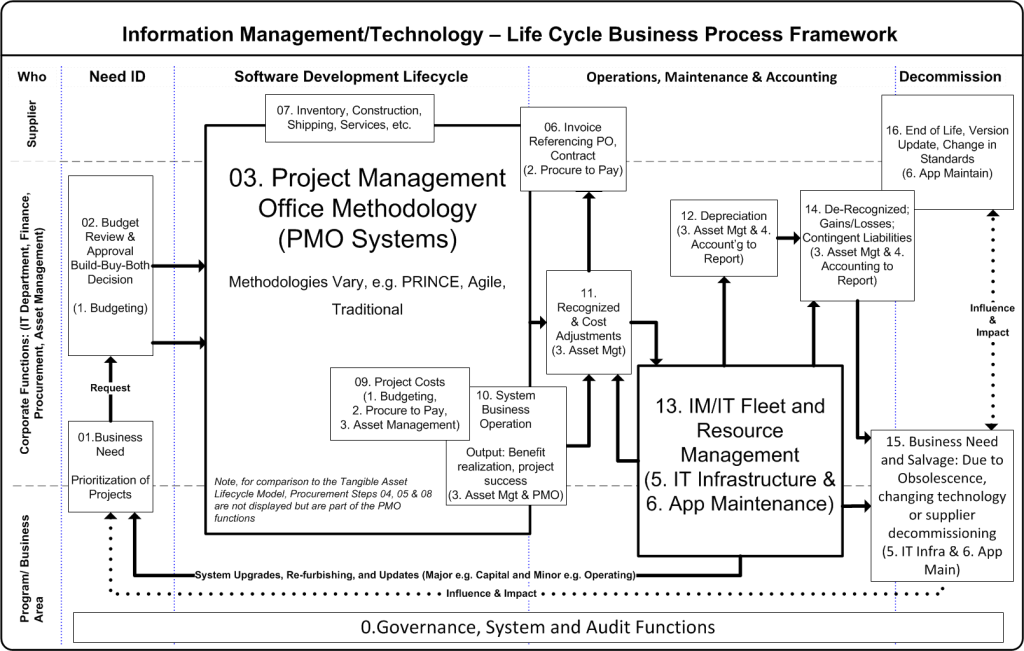
The IM/IT Lifecycle Model is an adaptation of the Asset Lifecycle Model. While the Asset Lifecycle Model focuses on the management of tangible assets, the IM/IT variation is concerned with the acquisition of things like computers and technology systems. The governance, system and audit functions at the bottom of the model answer questions #3, what is an organization’s IM/IT capacity? All the other steps answer question #2, what are the organization’s IM/IT needs and are (or when/how will) these needs to be fulfilled or they support the accounting and reporting functions.
Information Management/ Techology Lifecycle Model (revised March 1 2014)
IM/IT resources move through the model from left to right and may use more or less of each step depending upon the nature of the IM/IT system. In theory the model applies equally well to both technology (infrastructure, applications) as to information itself (data, reporting, data standards, etc.).
Two steps of note are Step 03 and 13. Step 03, the Project Management Office (PMO) replaces the requirements specification in the Asset Lifecycle Model but is broader and ideally encompasses other steps. For example, a good PMO methodology incorporates procurement processes such as issuing requests for proposals (Step 04), managing resulting vendor contracts (Step 05) and managing the vendor provision of assets, software, licenses or consulting services (Step 07).
Step 13 replaces the asset management function in the Asset Lifecycle Model. It includes in or outsourced functions such as application maintenance or technology production management. In an ideal world, these processes and systems drive the accounting of IM/IT. For example, an application built, capitalized but then abandoned is identified in this Step and communicated to the accounting system for de-recognition or conversely adjustments to the amortization schedule. Step 13 also straddles the central corporate IT and business area functions as it should be a partnership between the two.
Direct Attribute Costs (Step 09) and System Business Operations (Step 10) are purposely overlapped. Direct Attribute costs are the resources the organization brings to bear to implement a system. Examples can include the dedicated project staffing or costs to retrofit a data centre to accommodate new servers supporting an application. System Business Operations by contrast are the costs and effort to commission the system and bring it online. From an organizational perspective, Step 10 asks (and answers) the question, does the IM/IT resource meet the business needs identified for the asset?
Enterprise Resource Planning and the IM/IT Lifecycle
Included in each step are possible metrics as well as the information system such as the organization’s Enterprise Resource Planning (ERP) tool or Information Technology System that may support the step. For brevity, the following ERP components are used:
(1. Budgeting): the planning, monitoring and resource allocation functions.
(2. Procure to Pay): from requisition to payment including the treasury management functions.
(3. Asset management): the receipt, installation, maintenance, tracking and disposal of assets.
(4. Accounting to Reporting): the proper accounting, record keeping and reporting (internal and external) of assets.
(5. IT Infrastructure Management): the creation, maintenance of servers, networks, security systems, desktop access, operating systems and all components necessary to run one or more applications.
(6. Application Maintenance): the maintenance, support, bug/fix, user training, system administration and other functions necessary to maintain one or more applications that support a business process or function.
The purpose of this blog was to introduce the IM/IT Lifecycle Framework and place it in context to the SWOT+4 Model. In future blogs, I plan to drill down on each of the Steps and provide examples of systems, standards and best practices across organizations.
What do you think? Does your organization use a systematic method such as the IM/IT Lifecycle to plan, implement and manage your IM/IT investments? Where do your systems potentially lie within the model? For example, does your organization have a systematic PMO function or do you even know what is in your application fleet? Drop me a note and send me a comment with your perspectives.
The previous blog introduced the SWOT+4 Planning Model. The value of the model is the ability to focus on specific elements of IM/IT planning. Once an organization is successful with one part of the model, it can move on to other areas needing improvement. This blog will introduce a tool to evaluate the robustness of an organization’s IM/IT lifecycle. Intended to be an introduction, future blogs will drill down further.
The Role the IM/IT Lifecycle Model plays in the SWOT+4 Model
One of the first areas of model to evaluate is internally focused on the IM/IT needs and capabilities of the organization. In the SWOT+4 model these are represented by the organization’s IM/IT strengths and weaknesses and specifically questions 2 and 3:
Q2. ORGANIZATIONAL IM/IT: How can/does/should IM/IT support or impede what is important to the organization; does the organization have the right IM/IT and if not, when will it get it? (Answered by IM/IT Lifecycle Steps 01 through 16)
Q3. IM/IT CAPACITY: How well does the organization DO IM/IT, is it getting better, worse or about the same? (Answered by IM/IT Lifecycle Step 00)
Context for the IM/IT Lifecycle Model
The IM/IT Lifecycle Model is an adaptation of the Asset Lifecycle Model (source pending). While the Asset Lifecycle Model focuses on the management of tangible assets, the IM/IT variation is concerned with the acquisition of things like computers and technology systems. The governance, system and audit functions at the bottom of the model are used to answer questions #3, what is an organization’s IM/IT capacity? All the other steps answer question #2, what are the organization’s IM/IT needs and are (or when/how will) these needs to be fulfilled.
Information Management/ Techology Lifecycle MOdel
IM/IT resources move through the model from left to right and may use more or less of each step depending upon the nature of the system being acquired. Of note is step 03, the Project Management Office (PMO). This replaces the requirements specification in the Asset Lifecycle Model but is broader and ideally encompasses other steps. For example, a good PMO methodology incorporates procurement processes such as issuing requests for proposals (Step 04), managing resulting vendor contracts (Step 05) and managing the vendor provision of assets, software, licenses or consulting services (Step 07).
Direct Attribute Costs (Step 09) and System Business Operations (Step 10) are purposely overlapped. Direct Attribute costs are the resources the organization brings to bear to implement a system. Examples can include the dedicated project staffing or costs to retrofit a data centre to accommodate new servers supporting an application. System Business Operations by contrast are the costs and effort to commission the system and bring it online. From an organizational perspective, Step 10 asks (and answers) the question, does the IM/IT resource meet the business needs identified for the asset?
Enterprise Resource Planning and the IM/IT Lifecycle
Included in each step are possible metrics as well as the information system such as the organization’s Enterprise Resource Planning (ERP) tool that may support the step. For brevity, the following ERP components are used:
(1. Budgeting): the planning, monitoring and resource allocation functions.
(2. Procure to Pay): from requisition to payment including the treasury management functions.
(3. Asset management): the receipt, installation, maintenance, tracking and disposal of assets.
(4. Accounting to Reporting): the proper accounting, record keeping and reporting (internal and external) of assets.
The purpose of this blog was to introduce the IM/IT Lifecycle Framework and place it in context to the SWOT+4 Model. In future blogs, I plan to drill down on each of the Steps and provide examples of systems, standards and best practices across organizations.
What do you think? Does your organization use a systematic method such as the IM/IT Lifecycle to plan, implement and manage your IM/IT investments? Where do your systems potentially lie within the model? For example, does your organization have a systematic PMO function or do you even know what is in your application fleet? Drop me a note and send me a comment with your perspectives.
As a professional accountant, I am happy and obligated to record and report on my Professional Development (PD). This was easier as a CMA as I have always liked the Certified Management Accountants Competency Map.
Information Management/Technology (IM/IT) is expensive. As well, the advantages it provides are fleeting and easy to imitate (or worse steal). An organization must strategically and operationally plan for its investments in IM/IT. The problem is, what exactly should be in the Strategic or Operational plan, and what are the questions the plans are trying to answer?
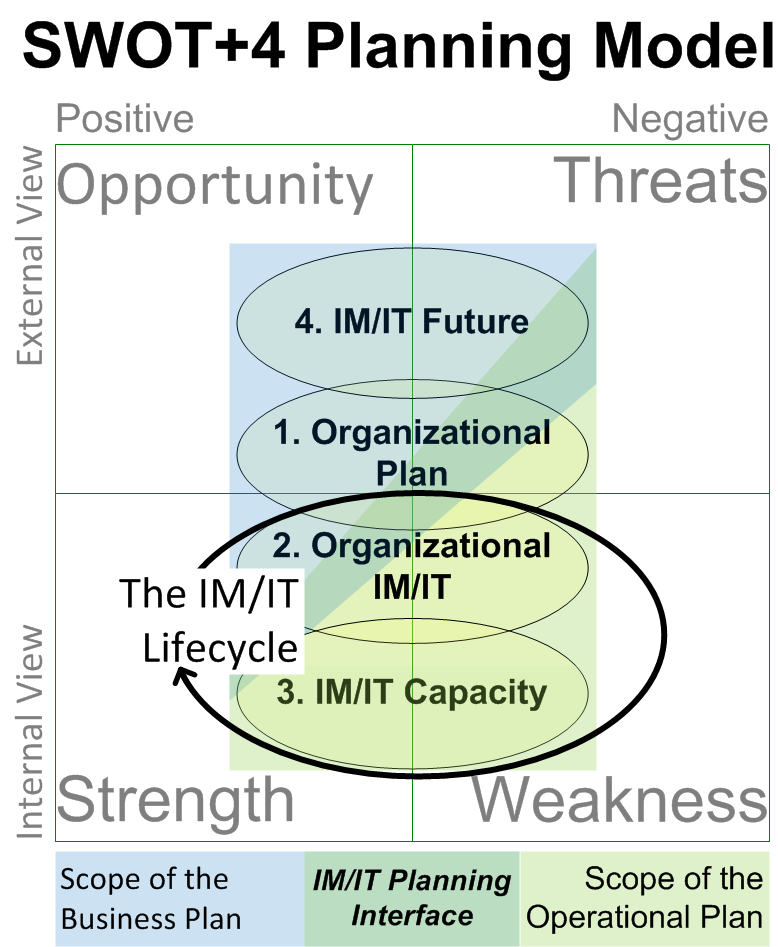
Over the past 20+ years I have being pondering these questions. Being a visual person, I have developed what I am calling the SWOT+4 IM/IT Planning Model. It is a bit busy but here it goes. At the centre is the SWOT matrix. Overlaying the SWOT matrix are the four-central IM/IT questions and on top of the questions are the respective planning tools to answer the questions.
SWOT+4 Planning Model
At the core of the SWOT+4 model are the organization’s Strengths, Weaknesses, Opportunities and Threats. This 2×2 matrix is a mainstay of strategic analysis. Although familiar to virtually everyone, in brief it is a method to view a situation from two key dimensions: internal versus external and positive versus negative. For example, Strengths are internal-positive attributes whereas Threats represents the external-negative possibilities.
Unfortunately, the SWOT tool is incomplete when it comes to evaluating an organization’s IM/IT. For example, is a change of technology an opportunity or a threat? Are the existing IM/IT systems a strength or a weakness? The answer to both questions is – it depends. As a result, I have used a Four Question Model for IM/IT Planning over the years as an analysis checklist. In order of priority the questions are:
ORGANIZATIONAL PLAN: What is important (e.g. priorities, plans and strategies) to the organization? This is at the centre of the model and crosses all four SWOT considerations. Included in this question are things like the organization’s vision, its mission, business plan(s), budgets and all things strategic.
ORGANIZATIONAL IM/IT: How can/does/should IM/IT support or impede what is important to the organization; does the organization have the right IM/IT and if not, when will it get it? This is an internal consideration although it touches the external dimensions of the SWOT model to represent amongst other things benchmarking and industry best practice. This question is ideally answered by both the strategic documents discussed above and the IT Department’s operational plan(s).
IM/IT CAPACITY: How well does the organization DO IM/IT, is it getting better, worse or about the same? What about the fleet of applications or physical resources; is the organization still running Windows 3.1, Office 95 or has it been able to adopt leading/bleeding edge technologies. How about the organization’s Bespoke and COTS applications, are they on current versions or getting long in the tooth? These questions are internal considerations for the organization.
IM/IT FUTURE: What is on the organizational event horizon that will affect or change the above? There are both threats and opportunities in this respect for an organization. Hacker activists, lower technology costs, legislation (e.g. privacy or technical) and changing industry standards are all examples of future changes that may be positive or negative.
Finally two typical planning tools are overlaid on the SWOT and 4 questions. The bottom and foundation is the organization’s business or strategic plan. IM/IT may have its own strategic plan or it may piggy back on a larger corporate plan. Irrespective, the plan should be able to answer the questions of (q1) what is important and (q4) what is on the horizon for the organization? The IM/IT operational plan focuses on the questions of (q3) current capacity and (q2) near term organizational IM/IT activities.
The delineation between the plans is not clear and ideally they should overlap each other rather than having a gap. The operational plan purposely extends into the Threat quadrant of the organization and the Business Plan relies on organizational strengths to capitalize on opportunities in the environment.
Beyond the Box
What do you think? Is the SWOT+4 Planning Model a muddled mess or does it provide a conceptual basis in which your organization can begin to structure its IM/IT planning. What is the value proposition to understanding and using the model well? I believe the model can support faster technology adoption, lower cost of implementation and ownership and better leveraging of IM/IT assets. Stay tuned as I am hoping to drill in a bit more into the model in future blogs. For example:
How a lifecycle approach can be used to measure IM/IT Capacity (q3)
The roles and technologies involved in delivering Organizational IM/IT (q2)
How much IM/IT should be in an organizational plan (q1), and
Where to buy a good crystal ball for the IM/IT Future (q4).






 Organizational Biology