
The article discusses the challenges small nonprofits face in tracking software issues and enhancements, especially those using bespoke applications. It introduces a simplified solution called BFE (Bugs, Faults, Enhancements), suggesting a customizable spreadsheet for efficient issue tracking. This approach balances practicality with the limited technical resources of small organizations.
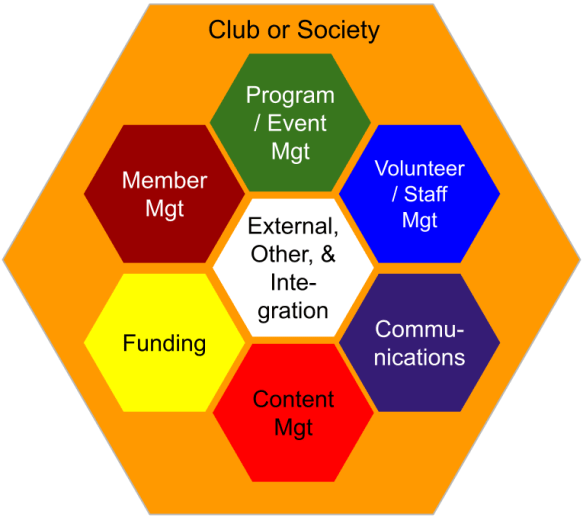
If you surveyed most small nonprofits (SNP), their information needs would align with the seven business processes noted above [1]. The information needs to support these business functions would be simple and are met mostly through manual processes. Some would use subscription-based software (for volunteer management, etc.) and a very few will have developed their own software (known as custom or bespoke).
Remembering the Three Use Cases
In respect to bespoke software, three ‘use cases’ introduced in the previous blog (see: A Small Organization, an Annoying Bug) might seem to be an anomaly as they each are using bespoke systems (custom software). As a quick reminder, without re-reading the previous bog (although it is a great blog, you should read it), the three use cases were:
- SAPAA: A small environmental organization that developed a bespoke application to track the state of specific natural areas in Alberta.
- Cycling Club: A Canadian based cycling club that runs trips for its members and uses a web-based application to manage registrations.
- Healthcare: A consulting company that developed a proprietary workforce planning tool sold across Canada and internationally.
Beyond these use cases, all organizations using technology can benefit from tracking how that tech is working and what would even work better. In other words, what Bugs, Faults or Enhancements (BFE) need to be tracked and managed?
Defining a BFE
Nomenclature notes on the BFE and in particular the ‘Fault’ part:
- Bug. A problem (or known error) caused by a defect in software or configuration.
- Fault. A system problem not related to software code, configuration, or user error.
- Enhancement. An improvement to the system.
Code based changes are covered by the ‘Bug’ part including implementing the repair. This is fine but what happens if the problem is with the data, a network issue, or something that nary a lick of code will fix, enter the Fault.
A Fault covers anything that is not code based. Examples may include a problem with the data, the network, or hardware. Many times, the attribution of a Bug or Fault title will be a matter of degree rather than absolutes.
Practical BFE Management
The user will not know whether something is a Bug or a Fault and so everything is a Bug until re-categorized as a Fault. Bugs and Faults may lead to an Enhancement which is a request for new or modified features such as functions, services, reports, etc.
Why bother differentiating these three? Because it helps in assigning work, developing work arounds, or in developing future enhancements. For most users, it will seem to be semantics. For a development team, a Bug versus a Fault is a matter of work assignment. By way of planning, Bugs might have been anticipated and avoided with better design (maybe) whereas predicting a Fault is more difficult.
Use Case Importance of the BFE Differentiation
- SAPAA: Bugs and Faults will create minor version updates (e.g. X.1, X.2, etc.) whereas a collection of Enhancements will create major version updates (e.g. 2.0, 3.0). As secondary data is brought into the system from third parties, the Fault part will be more critical.
- Cycling Club: Collecting the BFE’s can help with the system replacement process. Bugs and Faults are unlikely to be resolved as the code is largely frozen. Instead, they become requirements when comparing future options.
- Healthcare: Providing a release notes for future versions is critical activity to give client’s comfort about the stability of the system. Enhancements maybe a way to keep clients engaged and invested in using the system. A larger Enhancement list may also attract buyers for the software as they can see how the system fits into their own product strategic road maps.
ITSM, Please Forgive Me For I Have BFE’d
As anyone knows in the IT field, managing proposed enhancements, bugs, and critical failures is a full-time job. To help with this complexity, the industry has developed various Information technology service management (ITSM) frameworks (see previous blog).
BFE does not follow industry standards as it is designed for small organizations with very limited technical knowledge and even fewer resources. An ITIL trained board member may squirm with the bastardization of the framework. On the other hand, very few boards are lucky enough to have someone with ITIL training!
- SAPAA: ITSM tools and frameworks are used by the student teams as part of their studies. While the BFE does not follow these standards in practice, it aligns with the concepts of the standards in principle.
- Cycling Club: ITSM tools and frameworks might be used for the re-development of the system. It is unclear if the legacy-developer was trained in any of these methods and used them. The lack of a code repository, testing environment, etc. suggests not.
- Healthcare: Acknowledge of a ITSM framework can both provide comfort to the clients but also reduce the purchase risk to anyone considering buying the software.
BFE and SNP’s BFF’s
The BFE tool is a ‘just enough’ issue tracking method that might become your SNP’s best friend forever (BFF). Okay, perhaps a bit strong so how the BFE and SNP are passing acquaintances who give each other a languid wave as they pass each other in the grocery store?
The BFE can be used for any organizational system. The above definition purposely uses the term system. For example, a club may use Google Forms and spreadsheets to manage critical functions. If that form sits in the account of one user, and if that user disappears, that functionality has disappeared.
Alternatively, that volunteer may be bombarded with bugs and ideas to improve the Google Form. Which idea/bug should be acted on first and which can stew for a while.
- SAPAA: SAPAA uses other technologies that might benefit from a BFE list. This includes form technologies on its website (to manage field trips, etc.) or the website itself.
- Cycling Club: The BFE is restricted to the registration system.
- Healthcare: as a sole product company, there are no other technologies to monitor and thus needed to be tracked within the BFE.
The BFE’s System
And now to introduce the BFE, drum roll please, and it is a … spreadsheet?
It is a spreadsheet and is one reasonably researched. The columns are included because they represent best practice. The other advantage of the BFE being a spreadsheet is that it is customizable to an organization’s needs and specific circumstances.
You are welcome to use either version. All that I ask in return is that if you use it, let me know your (good, bad, or indifferent). A bit of attribution is always nice (link to this blog post to do so).
A BFE Tour
The BFE is broken into 3 tabs. The BFE-Log is where individuals rows capture one Bug, Fault, or Enhancement (BFE). The FLAG tab is for the look up values used in the BFE. The Data-Dictionary provides definitions for the columns (reproduced below in the shutter).
BFE Columns, Definitions, and Usage
There are 17 columns, all of which are defined below. Feel free to simplify (delete columns) or customize (add or change columns) as required.
| Term | Name | Definition |
|---|---|---|
| No. | ID Number | A catalog number |
| Severity | Severity | What is the impact of the item on specific or generalized users? |
| Priority | Priority | Numeric value from 1 to 99 indicating the relative order an item must be worked on. |
| Type | BFE Type | What is the nature of the issue. |
| Owner | Owner | Business Owner for the item |
| Fixer | Fixer | Technical resource assigned to the item. |
| Status | Status | Where an item is in its lifecycle from idea to completion/abandonment. |
| What | Issue Summary | In 2-5 words, what needs to change to resolve the issue |
| Description | Description | A summary of why the item is on the list, its resolution, business impact, and rationale for its severity and priority |
| Work Around | Work Around | How is the user accomodating the issue currently |
| Precursor | Precursor | What needs to be completed first before this issue can be tackled. |
| Where | App Location | Where in the application is this issue currently manifested, e.g. which screen, navigation path, report, etc. |
| When ID | When Identified | When was the issue first noted and logged. |
| GitHub | Link to GitHub | Linkage to the GitHub system for reference |
| When Fix | Completion | When was the issue resolved to the satisfaction of the business? |
| Subject Line | Calculated field to reference the issue in emails | |
| Notes | Notes | Other details not included in the above. |
- SAPAA: SAPAA is currently using the BFE.
- Cycling Club: Include a differentiation of what is impacted, does the WordPress need to be changed or the underlying code?
- Healthcare: A track for whether this item is relevant to a single installation (e.g. one province), a subset of installations, or is germane to the software as a whole.
BFE Meets SAM-IAM
The BFE can be integrated into a system access tool (introduced previously in the Hello, Sam IAM and Tracking Sam IAM posts). In this way, a single systems list is used to record issues and the list of systems from SAM-IAM can be added as a drop down in the BFE-Log.
Returning to the three use-cases, I would not bother doing this for any of them (see: A Small Organization, an Annoying Bug).
- SAPAA only has one application and the BFE needs to be extracted for the student development teams without compromising security and access information.
- Cycling Club might want to integrate its website-BFE into its SAM-IAM unless it plans to redevelop the website in the near future.
- Healthcare company has many different clients and so tracking access to each of these install bases and the overall BFE’s does not make sense.
WHERE’s the BFE?!
Now that we have a container to store the assorted Bugs, Faults and Enhancements, where to store it and how to use it? The answer will depend on your user community. If they are passive and mostly disengaged, then adding items should be managed by a designated resource. Conversely, users who are more vested might have a ‘Contact Us’ button and perhaps even access to the future feature and bug list through the application.
If you have integrated the BFE into your SAM-IAM tracking tool, I would definitely not distribute this file. Knowing which system an organization has access to and by whom would be a hacker’s dream come true! Finally, keep the BFE private and not publicly posted. Such a list may inadvertently expose system vulnerabilities.
- SAPAA: Because the app has a very small user base and is relatively new, the BFE is being managed by the product owner with limited input from users.
- Cycling Club: Unfortunately asking for Bugs or Enhancements would open up a can of expectations on the part of the users. Until re-development is reasonably certain, the BFE should be a quiet and restricted file. If re-development is imminent, then publicize the BFE.
- Healthcare: Many software vendors run user communities to collect Bugs and Enhancements. Often the vendor will prioritize these in future release cycles.
A BFE’ CRUD
Whether publicly exposed or not, an organization will need to design a ‘CRUD’ process for the BFE. That is, how an item is Created’; Read by the technical team, users, and board; Updated as information is collected and better understood; and of course, the item is closed and its status Determined. This might be done at the leadership level or delegated to an IT team to ‘take care of’.
- SAPAA: The BFE CRUD follows the school semester cycle.
- Cycling Club: See the above discussion on re-development.
- Healthcare: See the above discussion on user communities. In addition, specific clients may have unique Enhancement needs, for example changes to the geographic organization of healthcare delivery.
More Than A Niche Problem
As nonprofits deal with shrinking volunteer pools and fewer financial resources, technology can be an enabler. While this blog has dealt with systems such as a bespoke application or SaaS, the BFE could just as easily track a critical spreadsheet or even whether Facebook is the best to organize events.
Maintaining a BFE for these systems may be useful when a nonprofit is weighing the benefits of staying on an existing system, buying a service, or moving to another. In addition, a good SaaS-vendor will welcome enhancement and a bug list, (if not, perhaps it is time to move on to another SaaS…).
- SAPAA: Will use its BFE to support its student developers
- Cycling Club: Will use BFE to plan for its system re-development and track high risk issues.
- Healthcare: Will use the BFE as part of its natural release cycle, improve compliance with client ITSM standards, and increase the perceived value of the product for future sale.
There you have it, a BFE might be your organization’s Best Friend for Forever. Probably not, but at least it is a tool to manage information about your Bugs, Faults, and great Enhancement ideas!
As always, send me your comments and thoughts on BFE’s.
Notes and References
- This landscape was introduced in the blog, The SNP’s Technology Shopping Cart.

