
What are challenges faced by small organizations that require bespoke software solutions? While there are IT service management tools available, these are often too large and costly to be realistic aids. This article sets the context for a subsequent post on the Bug, Fault, and Enhancement tool.
What does a small environmental nonprofit, an international cycling club, and a specialized healthcare consulting company all have in common? Each has built a custom or bespoke system, and none have the Time, Talent, or Treasure to use industry standard ITSM tools. In this post, we learn more about these organizations and why big frameworks don’t work for them as they manage their software bugs and enhancements.
Be-What, COTS and a SaaS?
Before getting too far, some definitions and terminology:
- Bespoke (custom) software: Once upon a time, an organization had to build or at least implement third party software in their own hosting environment. Improved internet access, reliability, and capacity have shifted from bespoke to COTS systems [1]
- Commercial Off the Shelf Software (COTS): Ready‑made, mass‑produced software available for purchase by the general public, designed to meet common business or personal needs and deployed without custom development, though it may be configured after purchase. Configuration is the key concept here as it may involve anything from simple administrative changes to years of work with consultants
- Software as a Service (SaaS): A variation of COTS [2], this is a software distribution model in which users access applications hosted on remote servers over the internet in exchange for subscription payments (Investopedia). Increasingly this is becoming the primary method of delivering everything from Facebook to Microsoft Office.
There are other methods of delivering software and this extensive list is WAY beyond the point of this blog. Expand the shutter below if curious (or keep reading).
Table of Software Delivery Models
The software‑delivery model comparison table was prepared using publicly available 2025–2026 industry sources. This table was developed with support from Microsoft Copilot, insert normal caveats here about AI usage.
| Name | Definition | Cost Pattern | Most Common Usage |
|---|---|---|---|
| 1. Commercial Off‑the‑Shelf (COTS) | Ready‑made, mass‑market software sold broadly with minimal customization. | Upfront license + optional support fees. | General business operations, accounting, CRM, HRIS. |
| 2. Bespoke / Custom Software | Fully custom‑built for one organization’s unique workflows and requirements. | High initial build cost + ongoing maintenance. | Specialized nonprofit workflows, unique operational systems. |
| 3. Software as a Service (SaaS) | Cloud‑hosted software accessed via subscription; vendor manages hosting, updates, security. | Monthly/annual subscription. | Productivity suites, CRM, donor management, ERP. |
| 4. On‑Premise Software | Installed and run on an organization’s own servers and infrastructure. | Hardware + license + IT staffing. | Regulated sectors, data‑sovereignty requirements. |
| 5. Open‑Source Software (OSS) | Source code is publicly available; organizations can use, modify, and self‑host. | Free license; cost in hosting + customization. | Web platforms, CMS, developer tools, research. |
| 6. Managed Service / Application Management | Vendor provides software plus ongoing operation, monitoring, and support. | Monthly service fee. | Organizations lacking internal IT capacity. |
| 7. Platform as a Service (PaaS) | Cloud platform providing tools/environments for building and deploying applications. | Usage‑based (compute, storage). | Custom app development, integrations, APIs. |
| 8. Infrastructure as a Service (IaaS) | Cloud‑based virtualized servers, storage, networking used to host software. | Usage‑based (VMs, bandwidth). | Hosting custom apps, migrations from on‑prem. |
| 9. Hybrid Delivery Models | Combination of SaaS, bespoke, COTS, and integrations. | Mixed subscription + development costs. | Modern enterprise stacks, multi‑system nonprofits. |
| 10. Low‑Code / No‑Code Platforms | Software delivered through configurable platforms where apps are assembled rather than coded. | Subscription + optional add‑ons. | Rapid internal tools, workflow automation. |
| 11. Mobile App Store Distribution | Software delivered via Apple App Store / Google Play. | Free, freemium, or paid apps. | Consumer apps, field‑work tools, volunteer apps. |
| 12. Containerized / Microservices Delivery | Software delivered as modular services deployed via Docker/Kubernetes. | Cloud compute + orchestration costs. | Scalable enterprise systems, modern dev teams. |
| 13. Embedded Software / Firmware | Software delivered inside hardware devices (IoT, machinery, vehicles). | Included in hardware; updates vary. | Sensors, kiosks, equipment, field devices. |
Software is an Enabler
Technology is an enabler and can create unique products and services valuable to both non and for-profit organizations. COTS and SaaS reduces the cost of software and has given organizations functionality only dreamed of by the biggest organizations a few decades ago.
COTS and SaaS also reduce risks to an organization [3]. Subscribe to software, pay an annual fee, and let that vendor worry about updates, security, etc. This type of software now covers virtually all business functions from marketing to membership management. This breadth and range were discussed in a previous blog, The SNP’s Technology Shopping Cart and Free Software, Get Your Free Software…..
Three Small Organizations, One Larger Problem
Despite the rich COTS and SaaS market, sometimes, an organization needs to build their own application. This is because it is not available (yet), business requirements are truly unique, or it is a legacy application and getting off it is proving difficult.
Use Case 1: SIR-SAPAA
The Site Inspection Report (tool) for the Stewards of Alberta’s Natural Areas Association (or, SIR-SAPAA) manages the inspection and analysis of the state of natural areas in the province. It collects information ranging from what should be in a natural areas (e.g. bugs, plants, trails) to how it is being abused (e.g. off highway vehicles, dumping, illegal resource extraction). Users can add a new report as well as review forty years of history of past inspections.
SIR-SAPAA v 1.0 was launched in Spring of 2026. While stable, it lacks key functionality and is a bit buggy. SAPAA does not have a dedicated development team and instead relies on students completing assignments (see Project 1 and 2). Given this revolving door, GitHub is essential for continuity of the IT resources (more on GitHub below). SAPAA needs a ‘business’ focused list of Bugs, Faults, and great new ideas for Enhancements.
Use Case 2: Cycling Club
A cycling club runs specialized code built on a WordPress platform. This is both a bespoke system and a COTS-based solution—arguably the worst of both worlds. This organization is unable to upgrade WordPress because the person who wrote the code has since passed away. While the code was well written, it lacked documentation and instructions to maintain it.
The software performs very unique functions that would otherwise need to be done manually. For example, for popular international trips, a lottery is used for interested members who register for the trip. In addition, the software qualifies potential registrants according to experience particular to the trip or knowledge of routing software.
The club is in many ways running on borrowed time. The system is being held together with patches, duct tape, and chewing gum. Eventually the WordPress version will be retired or the version will represent too great of a risk to the organization. The sooner the club can track these problems and identify enhancements, the sooner this SNP can move off this solution.
Use Case 3: Healthcare Consulting
To round out the examples, a for-profit organization is included. This company has developed proprietary software to help governmental organizations with workforce planning. The software answers questions like “How many cardiologists or pharmacists are needed in a province over the next 5 years?”.
The software is a blend of algorithms but also deep social, demographic, and industry specific knowledge by the sole proprietor of the firm. This person has a contract development team and eventually would like to ‘cash out’ on the software. Both for this future sale and to help the company’s clients today, a list of Bugs, annoyances, and Enhancements would be worthwhile.
The Other Use Cases – Just In Case
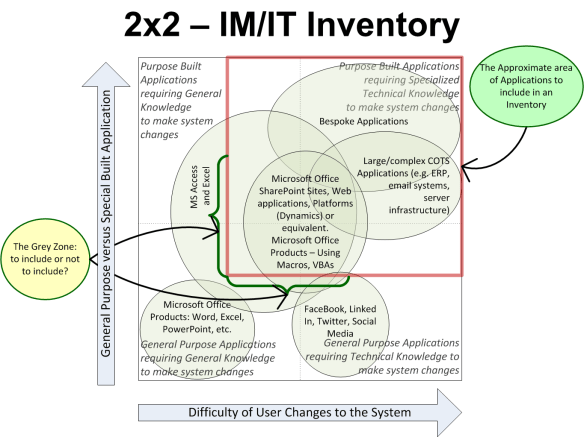
Each of the above use cases have software that you could figuratively point to. But what about a mission critical Google Form, a spreadsheet containing a list of funders, or a mission critical mail merge tool? These tools fall into the IM/IT Grey Zone.
ITSM to the Rescue, Maybe
Managing software is a complex affair and is not for the realm of cowboys. If the software for the first two use cases cease to work, it would be annoying and unfortunate but not catastrophic. Both organizations could use manual work arounds. The third use case is saving governments money and helping them plan better. If this software fails, a province can go back to manual estimation – but with almost no hope of the same level of accuracy and rigor.
Keeping systems running is why the IT industry has developed various Information technology service management (ITSM) frameworks. ITSM not only helps to avoid catastrophic errors, it also helps to develop systems by enforcing a consistent and disciplined approach. COBIT and ITIL are the most common [4] (to learn more about these frameworks, see the shutter below).
The 14 Recognized ITSM Frameworks (2026–2027)
This table of ITSM frameworks was developed using information synthesized from widely recognized 2026–2027 IT service‑management sources. The classification of “14 major ITSM frameworks” reflects consensus across contemporary practitioner guides and vendor‑neutral analyses. Content was generated with support from Microsoft Copilot, which aggregates and summarizes authoritative material to produce structured, evidence‑based technical references.
| Framework | Definition / Focus |
|---|---|
| ITIL | Most widely adopted ITSM framework; full service‑management lifecycle. |
| COBIT | Governance, risk, audit, and control of enterprise IT. |
| ISO/IEC 20000 | International standard for service‑management system certification. |
| DevOps | Collaboration between development and operations; continuous delivery. |
| Lean IT | Applying Lean principles to IT service improvement. |
| Agile Service Management (ASM) | Agile principles applied to ITSM process design. |
| MOF (Microsoft Operations Framework) | Microsoft’s guidance for IT service management and operations. |
| FitSM | Lightweight, practical ITSM framework for SMEs and simple environments. |
| IT4IT | Value‑chain model for managing the business of IT. |
| SIAM (Service Integration and Management) | Managing multiple service providers in a unified model. |
| BRM (Business Relationship Management) | Strengthening business–IT alignment and value realization. |
| TOGAF | Enterprise architecture framework often used alongside ITSM. |
| ITSM Methodologies (general) | Additional methodologies referenced in 2026 guides. |
| Other minor frameworks | Included in the InvGate count of 14 bodies of guidance. |
While arguing the merits of COBIT versus ITIL is great fun (ahhh… maybe??), these frameworks are WAY beyond the capacity of most SNPs. Each of the frameworks can be supported by ITSM Software which might be beyond a small organization’s reach []. The following are some examples of how the big boys manage their software.
How Much Will Your Issue (tracking) Cost You?
There are about ~100 ITSM and Work Management Platforms. Such tools are integrated into the organization’s ticket tracking system while others might be stand alone. For the techies in the audience, vendors include JIRA, Servicenow, or Github.
Most small nonprofits would qualify for a free tier. Cost aside, how many people on the nonprofit board or in the volunteer cadre are conversant with the tool and the underlying framework? Although powerful, the tools are not for the casual user and the need for a BFE.
Top 10 ITSM Work Management Tools and Costs
Pricing estimates and tool comparisons in this post were prepared using publicly available 2026 vendor pricing, product documentation, and market analysis from major issue‑tracking platforms. Annual cost ranges reflect typical usage patterns for small–medium organizations (1–10M revenue, <100 users) and are converted to CAD based on standard published rates.
Free and nonprofit‑friendly tiers are noted where vendors publicly offer them. This analysis was supported by Microsoft Copilot. The author has not validated the information as it is meant to be a generalization about the tools rather than as a specific set of recommendations.
| Rank | Tool | Free / Nonprofit Pricing? | Notes on Free / Nonprofit | Estimated Annual Cost (<100 users) |
|---|---|---|---|---|
| 1 | Jira Software | Yes – Free up to 10 users | Free tier is fully usable for small teams; paid tiers scale affordably | $2,520–$10,080 CAD for 20–100 users (Standard/Premium) |
| 2 | Azure DevOps Boards | No free nonprofit tier (but stakeholders are free) | First 5 users free; stakeholders free; paid users billed per seat | $1,200–$12,000 CAD depending on mix of paid vs free users |
| 3 | ServiceNow ITSM | No free tier; no nonprofit discount | Enterprise‑grade only; priced above typical nonprofit budgets | $80,000–$150,000 CAD even for small orgs (ITSM Standard) |
| 4 | Linear | Yes – Free tier (1 user) | Paid plan is extremely affordable; unlimited users on Pro | $1,200–$7,200 CAD for 20–100 users |
| 5 | monday.com Work Management | Yes – Free tier (2 seats) | Nonprofit discounts available; seats sold in blocks | $2,880–$12,000 CAD for 20–100 users (Standard/Pro) |
| 6 | GitHub Issues | Yes – Free tier | GitHub Free is fully usable; paid plans inexpensive | $480–$2,520 CAD for 20–100 users (Team/Enterprise) |
The BFE Problem
SNPs need to know how well their software is working, is the list of bugs growing, and what type of features are users wanting? An organization with a large IT budget can purchase ITSM software and follow the underlying framework. A small organization would be happy with just a list of bugs and the ability to track future enhancements. In other words, …
How does a small to medium-size nonprofit track its IT-system issues and enhancements in an efficient, effective, and centralized manner. An issue is anything that a typical user says impedes the systems functionality or ‘breaks the system’?
The BFE Solution… Maybe
Hopefully the use cases resonate with you, and you can recognize the above problem statement from your own SNP experience. In the next post, the Bug, Fault, and Enhancement Tool (BFE) is introduced and applied to the three use cases. While not a replacement for an ITSM Framework, it might be ‘just enough’ to help the three organizations better track and manage their respective IT assets.
Notes and Further Reading
- To learn more, read this excellent blog: Bespoke Software Meaning: Ultimate 2026 Guide.
- Is a SaaS always a COTS? Technically speaking, SaaS is a delivery method and COTS is a product category. Practically speaking for 99.99% of all readers, SaaS is a subset of COTS. I am ignoring this nuance to not bog down my blog. Pedantic readers are welcome to cluck and heap scorn on this definitional faux pas, everyone else, keep reading!
- There is a strategic risk to SaaS as well, namely locking an organization into a vendor. Risks organizations need to be aware of related to SaaS include: vendor lock‑in, data portability issues, sudden price increases, feature deprecations, outages they cannot control, and vendor exits the market. On balance, SaaS reduces risks, probably.
- IT service management – Wikipedia.
- There are lighter versions of these systems. Examples include: Jira Free or GitHub Issues. For the three use cases and purposes of this post, the point stands – they are beyond the capacity of small organizations.


Pingback: A BFE Could Be Your SNP’s BFF | Organizational Biology